<?xml version="1.0" encoding="utf-8"?>
<feed xmlns="http://www.w3.org/2005/Atom">
    <id>https://help.carbonvoice.app/whats-new</id>
    <title>Carbon Voice — What's New</title>
    <updated>2026-07-31T00:00:00.000Z</updated>
    <generator>https://github.com/jpmonette/feed</generator>
    <link rel="alternate" href="https://help.carbonvoice.app/whats-new"/>
    <subtitle>Product updates and announcements for Carbon Voice.</subtitle>
    <icon>https://help.carbonvoice.app/img/logo.svg</icon>
    <rights>Copyright © 2026 Phonon X, Inc.</rights>
    <entry>
        <title type="html"><![CDATA[More reactions, dark mode, faster sharing]]></title>
        <id>https://help.carbonvoice.app/whats-new/2026/07/31/more-reactions-dark-mode-faster-sharing</id>
        <link href="https://help.carbonvoice.app/whats-new/2026/07/31/more-reactions-dark-mode-faster-sharing"/>
        <updated>2026-07-31T00:00:00.000Z</updated>
        <summary type="html"><![CDATA[A batch of improvements — 1,400+ emoji reactions, dark mode, transcript selection on desktop, Obsidian sync, and moving conversations between workspaces.]]></summary>
        <content type="html"><![CDATA[<p>We've been shipping a steady stream of improvements based on your feedback. Here are a
few you may have missed.</p>
<h2 class="anchor anchorTargetStickyNavbar_Vzrq" id="more-reactions">More reactions<a href="https://help.carbonvoice.app/whats-new/2026/07/31/more-reactions-dark-mode-faster-sharing#more-reactions" class="hash-link" aria-label="Direct link to More reactions" title="Direct link to More reactions" translate="no">​</a></h2>
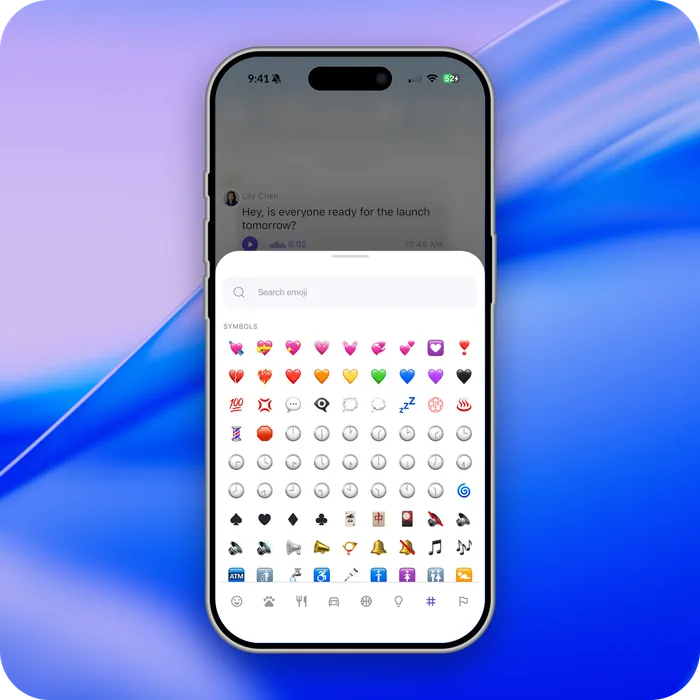
<p>Message reactions are no longer a fixed set — you can react using more than 1,400
emoji.</p>
<p><img decoding="async" loading="lazy" alt="The emoji reaction picker with a full emoji set" src="https://help.carbonvoice.app/assets/images/more-reactions-75da3a039f49b2388b262277573532e0.webp" width="700" height="700" class="img_ev3q"></p>
<h2 class="anchor anchorTargetStickyNavbar_Vzrq" id="see-who-reacted">See who reacted<a href="https://help.carbonvoice.app/whats-new/2026/07/31/more-reactions-dark-mode-faster-sharing#see-who-reacted" class="hash-link" aria-label="Direct link to See who reacted" title="Direct link to See who reacted" translate="no">​</a></h2>
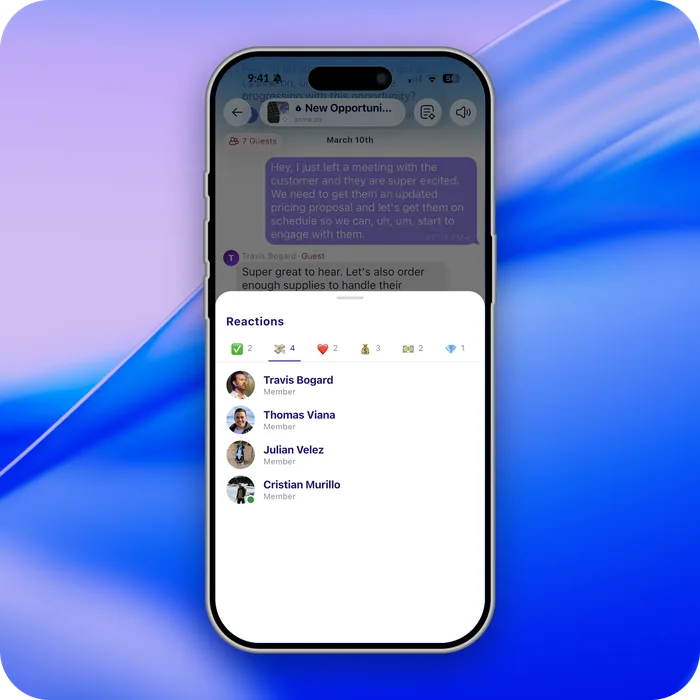
<p>Press and hold on a reaction, or right-click on desktop, to see everyone who reacted.</p>
<p><img decoding="async" loading="lazy" alt="The list of people who reacted to a message" src="https://help.carbonvoice.app/assets/images/who-reacted-ae054efdd220ae75c3bc007895cb1151.webp" width="700" height="700" class="img_ev3q"></p>
<h2 class="anchor anchorTargetStickyNavbar_Vzrq" id="dark-mode">Dark mode<a href="https://help.carbonvoice.app/whats-new/2026/07/31/more-reactions-dark-mode-faster-sharing#dark-mode" class="hash-link" aria-label="Direct link to Dark mode" title="Direct link to Dark mode" translate="no">​</a></h2>
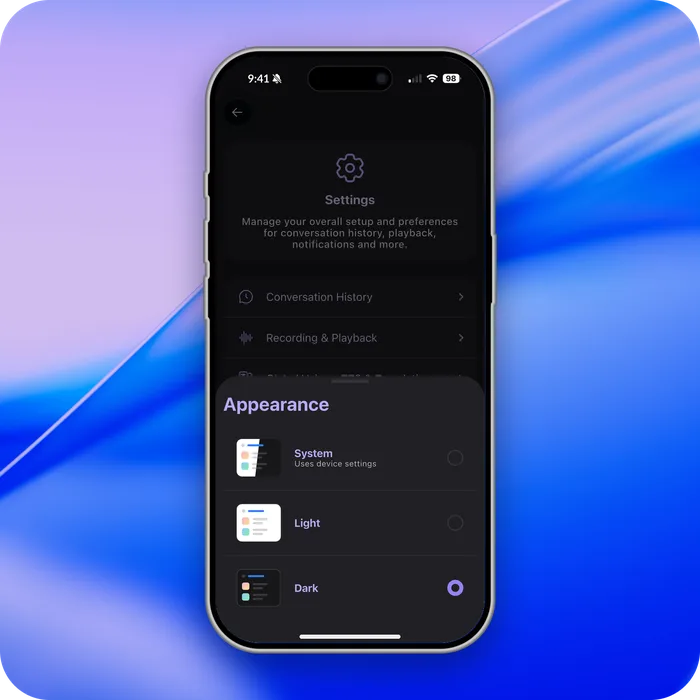
<p>Dark mode follows your phone settings, and you can make your own choice in settings.</p>
<p><img decoding="async" loading="lazy" alt="Carbon Voice in dark mode" src="https://help.carbonvoice.app/assets/images/dark-mode-f99bcf04cd745c0f1a91251a834b7e5d.webp" width="700" height="700" class="img_ev3q"></p>
<h2 class="anchor anchorTargetStickyNavbar_Vzrq" id="select-part-of-a-transcript-on-desktop">Select part of a transcript on desktop<a href="https://help.carbonvoice.app/whats-new/2026/07/31/more-reactions-dark-mode-faster-sharing#select-part-of-a-transcript-on-desktop" class="hash-link" aria-label="Direct link to Select part of a transcript on desktop" title="Direct link to Select part of a transcript on desktop" translate="no">​</a></h2>
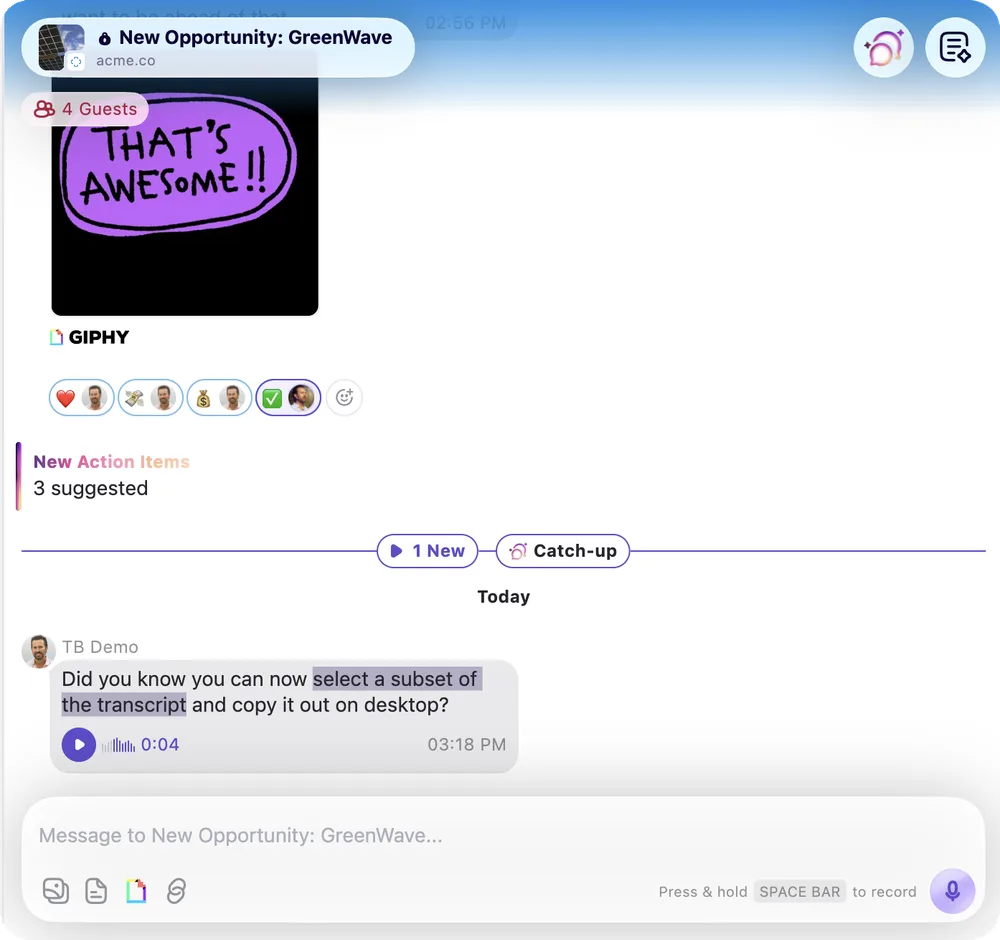
<p>Highlight and copy just the text you need from a transcript — useful for grabbing
quotes, notes, or action items.</p>
<p><img decoding="async" loading="lazy" alt="Selecting part of a transcript on desktop" src="https://help.carbonvoice.app/assets/images/select-transcript-desktop-4c0304ea59b6f770f3e726df3a285cc3.webp" width="1000" height="940" class="img_ev3q"></p>
<h2 class="anchor anchorTargetStickyNavbar_Vzrq" id="faster-voice-memo-sharing">Faster voice memo sharing<a href="https://help.carbonvoice.app/whats-new/2026/07/31/more-reactions-dark-mode-faster-sharing#faster-voice-memo-sharing" class="hash-link" aria-label="Direct link to Faster voice memo sharing" title="Direct link to Faster voice memo sharing" translate="no">​</a></h2>
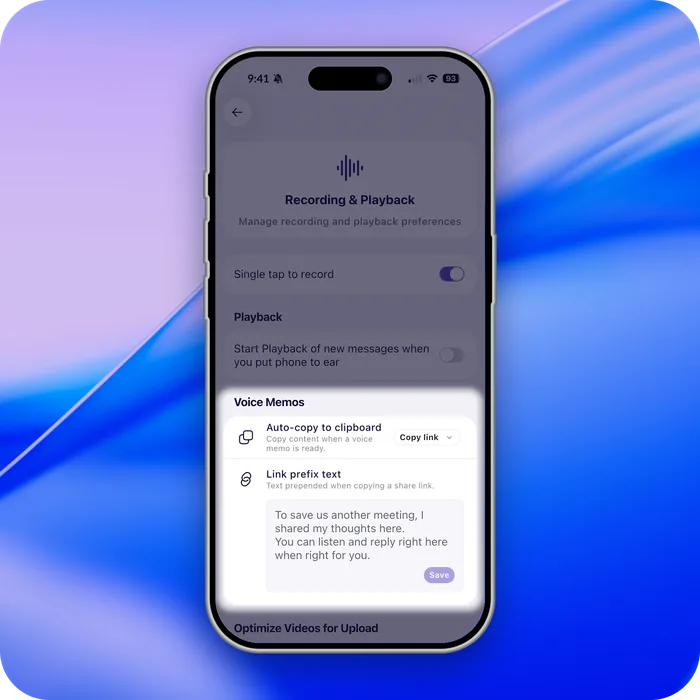
<p>When you create a voice memo, a shareable link is copied to your clipboard
automatically, along with customizable text.</p>
<p><img decoding="async" loading="lazy" alt="A shareable link copied automatically after recording a voice memo" src="https://help.carbonvoice.app/assets/images/faster-voice-memo-sharing-e4e852a15921ac7acc110e2a971648f6.webp" width="700" height="700" class="img_ev3q"></p>
<h2 class="anchor anchorTargetStickyNavbar_Vzrq" id="embed-voice-messages-on-a-website">Embed voice messages on a website<a href="https://help.carbonvoice.app/whats-new/2026/07/31/more-reactions-dark-mode-faster-sharing#embed-voice-messages-on-a-website" class="hash-link" aria-label="Direct link to Embed voice messages on a website" title="Direct link to Embed voice messages on a website" translate="no">​</a></h2>
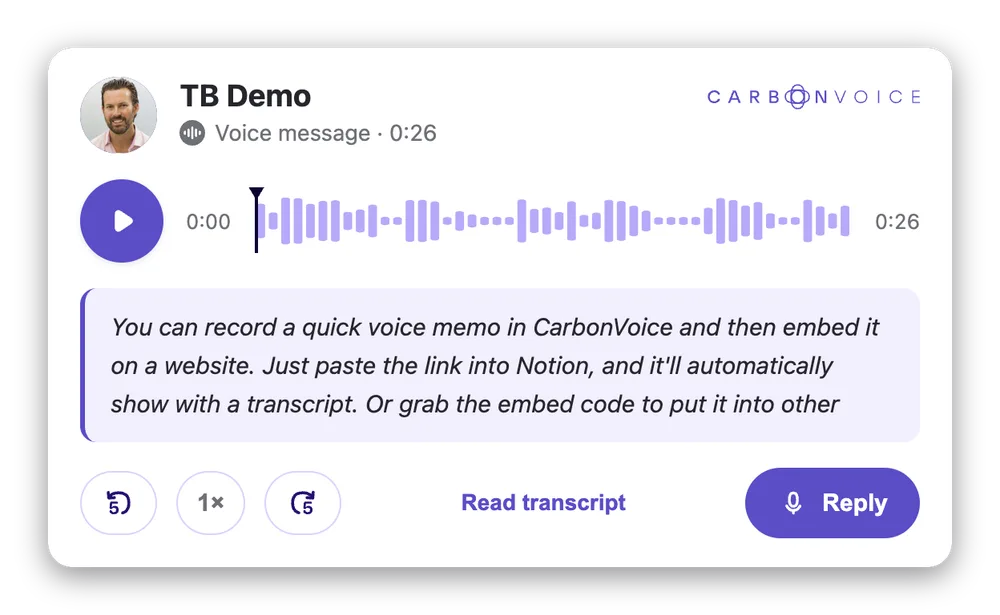
<p>Embed a voice memo and its transcript on any website, blog, or Notion page. Create a
shareable link and paste it into Notion as an embed, or take the embed code from
message details.</p>
<p><img decoding="async" loading="lazy" alt="An embedded voice message with its transcript on a web page" src="https://help.carbonvoice.app/assets/images/embed-voice-message-265948302db4808c8c86d016d4e34ceb.webp" width="1000" height="615" class="img_ev3q"></p>
<h2 class="anchor anchorTargetStickyNavbar_Vzrq" id="sync-with-obsidian">Sync with Obsidian<a href="https://help.carbonvoice.app/whats-new/2026/07/31/more-reactions-dark-mode-faster-sharing#sync-with-obsidian" class="hash-link" aria-label="Direct link to Sync with Obsidian" title="Direct link to Sync with Obsidian" translate="no">​</a></h2>
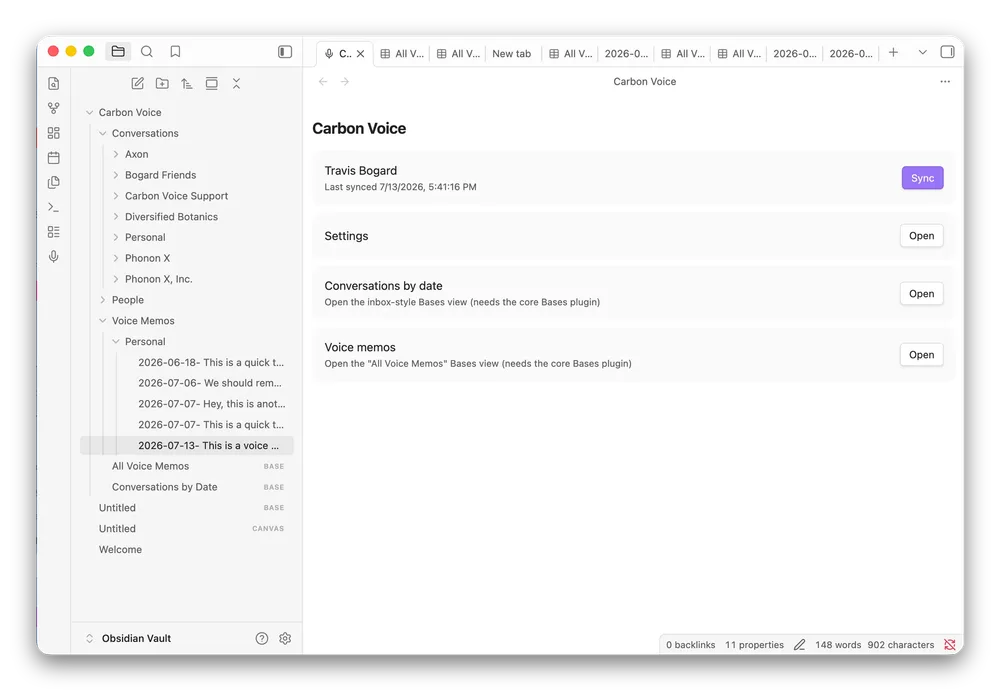
<p>Sync your voice memos and conversations into Obsidian using the
<a href="https://community.obsidian.md/plugins/carbon-voice-sync" target="_blank" rel="noopener noreferrer" class="">Carbon Voice Sync plugin</a>.</p>
<p><img decoding="async" loading="lazy" alt="Voice memos synced into an Obsidian vault" src="https://help.carbonvoice.app/assets/images/obsidian-sync-fd0c4db9e41d07195e6bb0724816ea2d.webp" width="1000" height="691" class="img_ev3q"></p>
<h2 class="anchor anchorTargetStickyNavbar_Vzrq" id="move-conversations">Move conversations<a href="https://help.carbonvoice.app/whats-new/2026/07/31/more-reactions-dark-mode-faster-sharing#move-conversations" class="hash-link" aria-label="Direct link to Move conversations" title="Direct link to Move conversations" translate="no">​</a></h2>
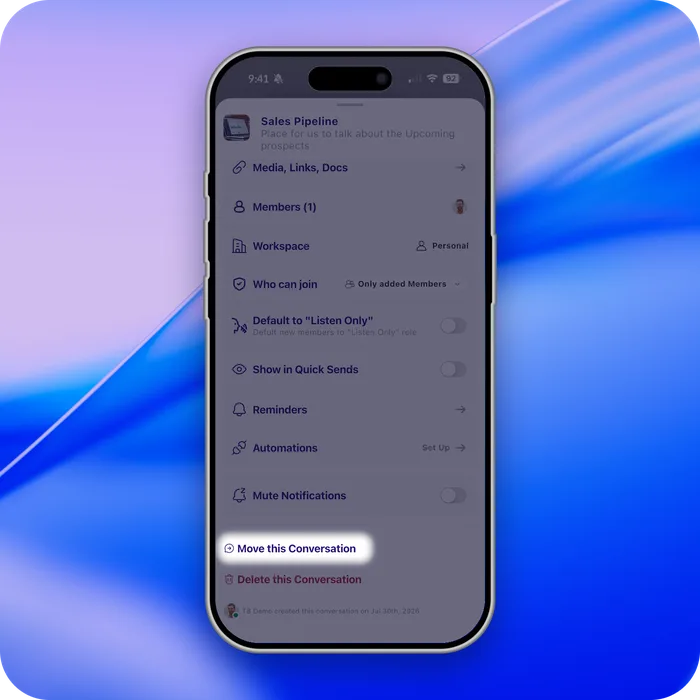
<p>Created a conversation before you had a workspace? You can now move it into one — open
the conversation menu (<strong>⋯</strong>) and select <strong>Move Conversation</strong>.</p>
<p><img decoding="async" loading="lazy" alt="The Move Conversation option in the conversation menu" src="https://help.carbonvoice.app/assets/images/move-conversation-46ac0fd7ca2394dfe41219aded54d2cd.webp" width="700" height="700" class="img_ev3q"></p>
<h2 class="anchor anchorTargetStickyNavbar_Vzrq" id="mark-conversations-as-read-from-one-page">Mark conversations as read from one page<a href="https://help.carbonvoice.app/whats-new/2026/07/31/more-reactions-dark-mode-faster-sharing#mark-conversations-as-read-from-one-page" class="hash-link" aria-label="Direct link to Mark conversations as read from one page" title="Direct link to Mark conversations as read from one page" translate="no">​</a></h2>
<p>Your unread list is easier to manage: mark conversations as read without opening each
one.</p>
<h2 class="anchor anchorTargetStickyNavbar_Vzrq" id="faster-across-the-board">Faster across the board<a href="https://help.carbonvoice.app/whats-new/2026/07/31/more-reactions-dark-mode-faster-sharing#faster-across-the-board" class="hash-link" aria-label="Direct link to Faster across the board" title="Direct link to Faster across the board" translate="no">​</a></h2>
<p>Performance improvements throughout the app, with the web experience noticeably
quicker to load.</p>
<hr>
<p>Questions go to <strong>Profile Menu → Help → Support</strong>, and feedback to <strong>Profile Menu →
Help → Feedback</strong>.</p>]]></content>
        <author>
            <name>The Carbon Voice Team</name>
            <uri>https://getcarbon.app</uri>
        </author>
        <category label="release" term="release"/>
        <category label="reactions" term="reactions"/>
        <category label="dark-mode" term="dark-mode"/>
        <category label="voice-memos" term="voice-memos"/>
    </entry>
    <entry>
        <title type="html"><![CDATA[Your team has a new type of member]]></title>
        <id>https://help.carbonvoice.app/whats-new/2026/06/04/agent-accounts</id>
        <link href="https://help.carbonvoice.app/whats-new/2026/06/04/agent-accounts"/>
        <updated>2026-06-04T00:00:00.000Z</updated>
        <summary type="html"><![CDATA[Introducing agent accounts — talk to your AI agents the same way you talk to teammates, with desktop speed dial and tagging.]]></summary>
        <content type="html"><![CDATA[<p>We built Carbon Voice as a fast way to talk to your team. Then AI agents started
showing up at work — doing research, writing code, managing tasks, running workflows —
and the line between tool and teammate blurred.</p>
<p>Today we're making it official: <strong>Carbon Voice agent accounts</strong>. Your whole team, one
tap away, people and agents alike.</p>
<p>📺 <a href="https://youtu.be/jLXUlAgEuXk" target="_blank" rel="noopener noreferrer" class="">Watch: introducing agent accounts</a></p>
<h2 class="anchor anchorTargetStickyNavbar_Vzrq" id="how-it-works">How it works<a href="https://help.carbonvoice.app/whats-new/2026/06/04/agent-accounts#how-it-works" class="hash-link" aria-label="Direct link to How it works" title="Direct link to How it works" translate="no">​</a></h2>
<ul>
<li class=""><strong>One keystroke on desktop.</strong> Press <strong>⌥ + a number key</strong> from anywhere on your Mac
and start talking to anyone on your team, person or agent.</li>
<li class=""><strong>One tap on mobile.</strong> A quick swipe and you're talking.</li>
<li class=""><strong>Async by design.</strong> Speak your thought, move on, get pinged when they reply.</li>
</ul>
<h2 class="anchor anchorTargetStickyNavbar_Vzrq" id="1-create-your-agent-account">1. Create your agent account<a href="https://help.carbonvoice.app/whats-new/2026/06/04/agent-accounts#1-create-your-agent-account" class="hash-link" aria-label="Direct link to 1. Create your agent account" title="Direct link to 1. Create your agent account" translate="no">​</a></h2>
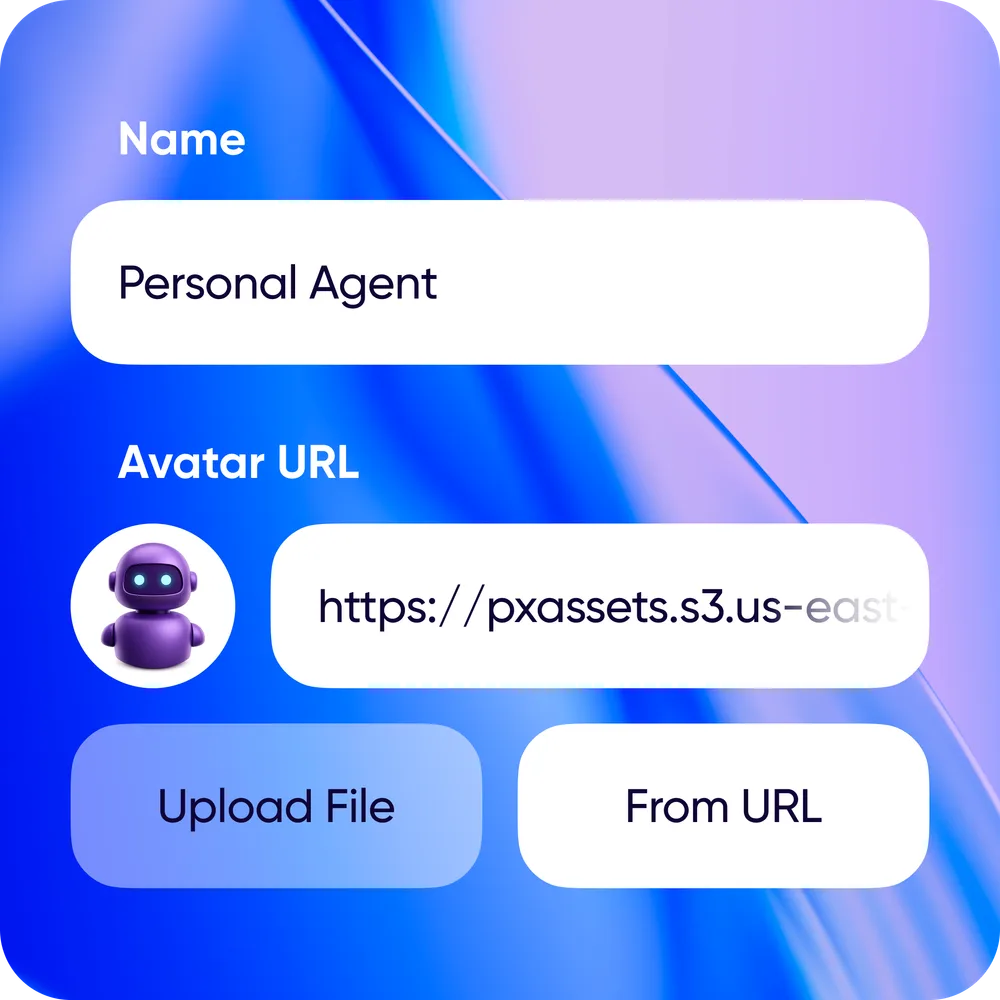
<p>Open Carbon Voice and go to the <strong>Agents panel</strong> — on the left on desktop, under the
profile menu on mobile. Tap <strong>Create New Agent</strong> and give it a name.</p>
<p><img decoding="async" loading="lazy" alt="The Agents panel with the Create New Agent option" src="https://help.carbonvoice.app/assets/images/create-agent-account-fa16030931606ed29d956c74037c9102.webp" width="1000" height="1000" class="img_ev3q"></p>
<p>Make sure you're on the latest version to see the new options.</p>
<h2 class="anchor anchorTargetStickyNavbar_Vzrq" id="2-connect-your-agent">2. Connect your agent<a href="https://help.carbonvoice.app/whats-new/2026/06/04/agent-accounts#2-connect-your-agent" class="hash-link" aria-label="Direct link to 2. Connect your agent" title="Direct link to 2. Connect your agent" translate="no">​</a></h2>
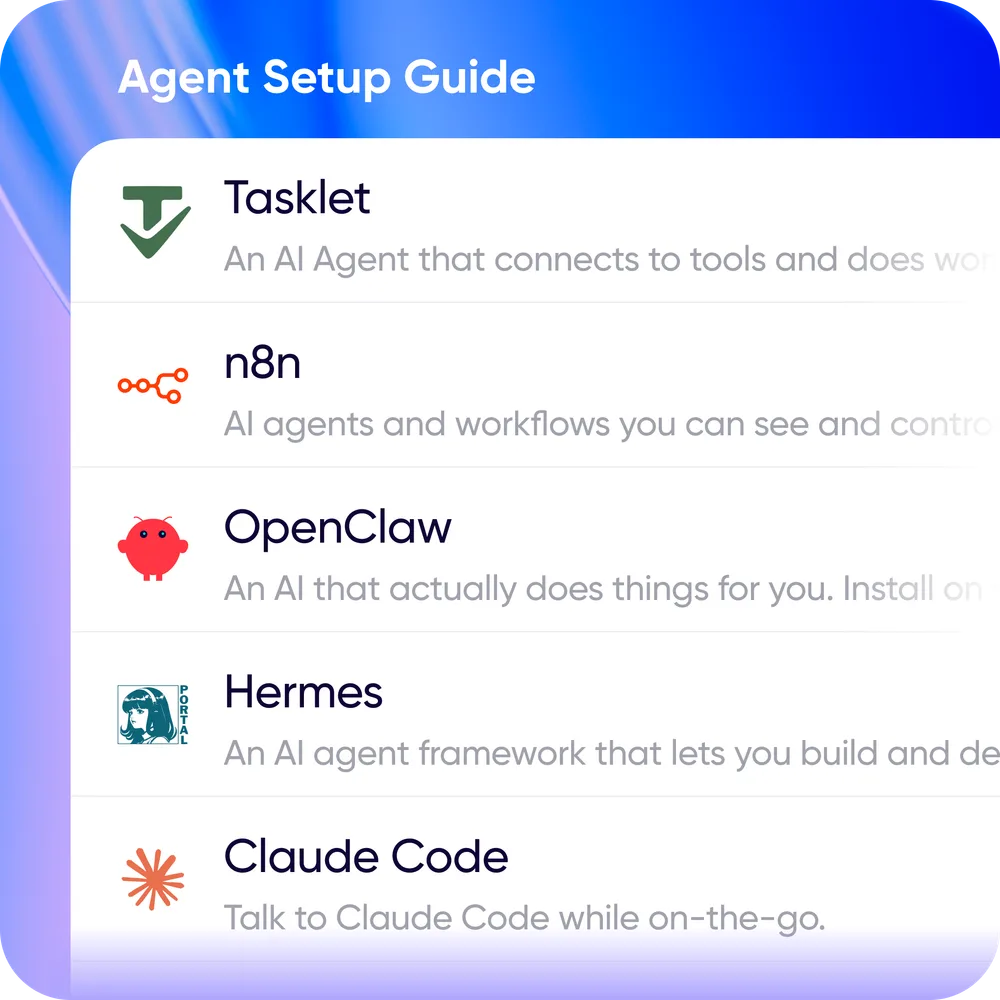
<p>Pick the agent platform you're using and follow its setup guide. Guides exist for
Hermes, OpenClaw, n8n, Claude Code, Tasklet, and generic webhooks — the list is
updated often, so let us know if yours is missing.</p>
<p><img decoding="async" loading="lazy" alt="Choosing an agent platform and following its setup guide" src="https://help.carbonvoice.app/assets/images/connect-agent-efe83a1b6f59d8fb9c65ea7db32526b2.webp" width="1000" height="1000" class="img_ev3q"></p>
<h2 class="anchor anchorTargetStickyNavbar_Vzrq" id="3-start-talking">3. Start talking<a href="https://help.carbonvoice.app/whats-new/2026/06/04/agent-accounts#3-start-talking" class="hash-link" aria-label="Direct link to 3. Start talking" title="Direct link to 3. Start talking" translate="no">​</a></h2>
<p>Talk to your agent like any other contact. It receives a transcript, processes it, and
responds — you hear it back as voice or read it, your call.</p>

<p><strong>Speed dial.</strong> On desktop, assign each agent its own hotkey: up to 10 agents, each one
keystroke away. Press <strong>⌥ ~</strong> to see your speed dial list, or <strong>⌥ 0–9</strong> to message an
agent directly. On mobile, add your agents to Quick Sends.</p>
<p><img decoding="async" loading="lazy" alt="Speed dial in action: one keystroke to start talking to an agent" src="https://help.carbonvoice.app/assets/images/agent-speed-dial-f6c6ad199f5ef3f09539af40cf95f304.webp" width="540" height="540" class="img_ev3q"></p>
<h2 class="anchor anchorTargetStickyNavbar_Vzrq" id="tagging-people-and-agents">Tagging people and agents<a href="https://help.carbonvoice.app/whats-new/2026/06/04/agent-accounts#tagging-people-and-agents" class="hash-link" aria-label="Direct link to Tagging people and agents" title="Direct link to Tagging people and agents" translate="no">​</a></h2>
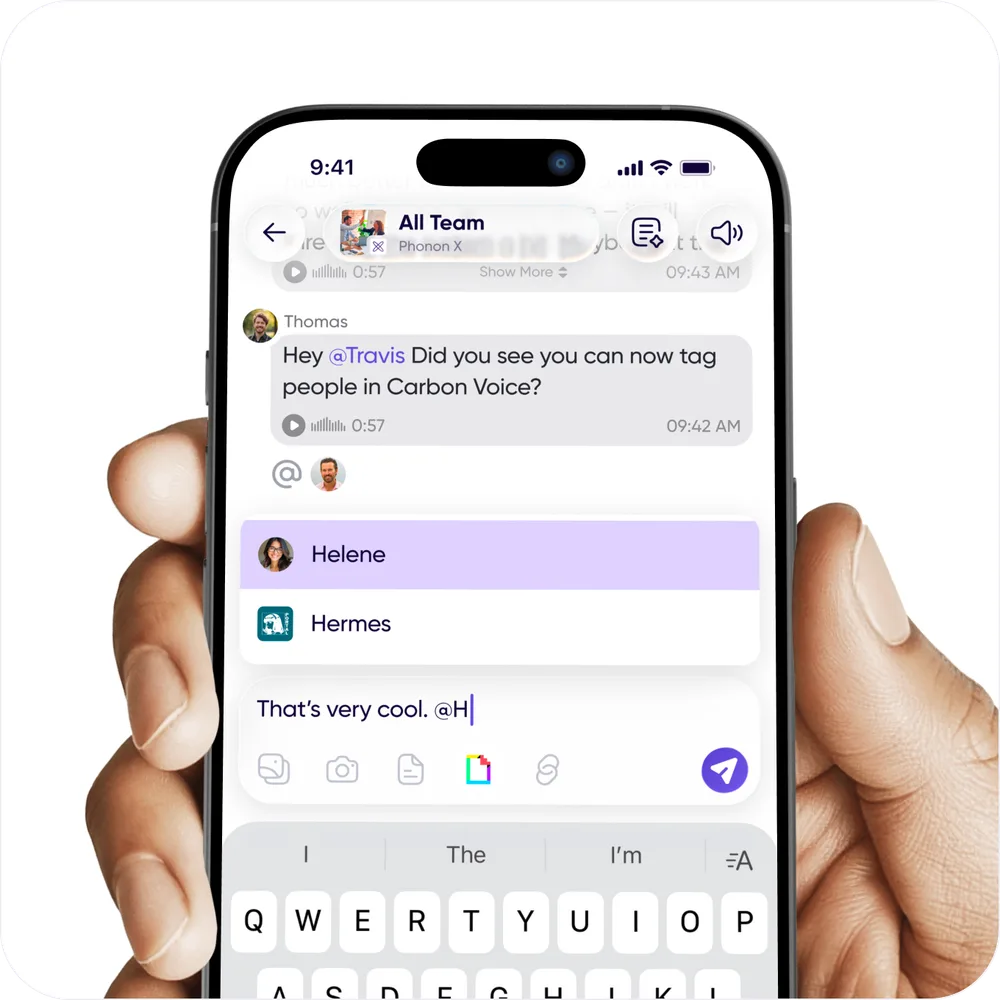
<p>This update also adds tagging, for people and agents alike. Some agents need to be
tagged in a group conversation before they'll engage. When you tag a person, they get
an extra push and inbox notification.</p>
<p><img decoding="async" loading="lazy" alt="Tagging a person or an agent in a conversation" src="https://help.carbonvoice.app/assets/images/tag-people-and-agents-ca9588c33a5ccf8a5175f3e003d98fda.webp" width="1000" height="1000" class="img_ev3q"></p>]]></content>
        <author>
            <name>The Carbon Voice Team</name>
            <uri>https://getcarbon.app</uri>
        </author>
        <category label="release" term="release"/>
        <category label="agents" term="agents"/>
        <category label="desktop" term="desktop"/>
    </entry>
    <entry>
        <title type="html"><![CDATA[Carbon Voice for Mac is here]]></title>
        <id>https://help.carbonvoice.app/whats-new/2026/05/12/carbon-voice-for-mac</id>
        <link href="https://help.carbonvoice.app/whats-new/2026/05/12/carbon-voice-for-mac"/>
        <updated>2026-05-12T00:00:00.000Z</updated>
        <summary type="html"><![CDATA[A desktop app with global keyboard shortcuts, so you can record and share a voice message from anywhere on your Mac.]]></summary>
        <content type="html"><![CDATA[<p><strong>One keystroke to skip the meeting.</strong></p>
<p>You already know async voice works. Today we made it faster. Carbon Voice for Mac is
live, and the desktop experience is a fundamentally new level of speed to talk.</p>
<p>📺 <a href="https://youtu.be/cQF5CwY7k8Q" target="_blank" rel="noopener noreferrer" class="">Watch: capture and share ideas from anywhere</a></p>
<h2 class="anchor anchorTargetStickyNavbar_Vzrq" id="global-keyboard-shortcut-option--v">Global keyboard shortcut: Option + V<a href="https://help.carbonvoice.app/whats-new/2026/05/12/carbon-voice-for-mac#global-keyboard-shortcut-option--v" class="hash-link" aria-label="Direct link to Global keyboard shortcut: Option + V" title="Direct link to Global keyboard shortcut: Option + V" translate="no">​</a></h2>
<p>Press <strong>Option + V</strong> from anywhere on your Mac. Talk. Get a shareable link instantly,
and send it anywhere you'd send a meeting invite.</p>
<p>That's it — faster than opening a calendar, faster than typing it out.</p>
<h2 class="anchor anchorTargetStickyNavbar_Vzrq" id="talk-to-your-team-quickly">Talk to your team quickly<a href="https://help.carbonvoice.app/whats-new/2026/05/12/carbon-voice-for-mac#talk-to-your-team-quickly" class="hash-link" aria-label="Direct link to Talk to your team quickly" title="Direct link to Talk to your team quickly" translate="no">​</a></h2>
<p><img decoding="async" loading="lazy" alt="Carbon Voice running on macOS" src="https://help.carbonvoice.app/assets/images/mac-desktop-7676052e7a68d74de4061cc64da5b1d2.webp" width="1000" height="625" class="img_ev3q"></p>
<p>Press <strong>Option + C</strong> from anywhere on your Mac to message or talk to any existing
conversation, and use the cutter to quickly attach screenshots.</p>
<h2 class="anchor anchorTargetStickyNavbar_Vzrq" id="whats-new-on-desktop">What's new on desktop<a href="https://help.carbonvoice.app/whats-new/2026/05/12/carbon-voice-for-mac#whats-new-on-desktop" class="hash-link" aria-label="Direct link to What's new on desktop" title="Direct link to What's new on desktop" translate="no">​</a></h2>
<ul>
<li class=""><strong>Option + V</strong> anywhere on your Mac to record and share instantly</li>
<li class="">Press and hold <strong>Space</strong> to record inside a conversation</li>
<li class=""><strong>Cmd + K</strong> to search across everything</li>
<li class=""><strong>Cmd + N</strong> to start a new conversation</li>
<li class="">Screenshot and attachment support</li>
</ul>
<p>Everything syncs across mobile, web, and desktop, so your conversations and voice memos
go wherever you go.</p>
<p><a href="https://getcarbon.app/download" target="_blank" rel="noopener noreferrer" class="">Download the app</a></p>
<p>A Windows version is coming soon. In the meantime, the updated desktop experience is
available at <a href="https://carbonvoice.app/" target="_blank" rel="noopener noreferrer" class="">carbonvoice.app</a>.</p>]]></content>
        <author>
            <name>The Carbon Voice Team</name>
            <uri>https://getcarbon.app</uri>
        </author>
        <category label="desktop" term="desktop"/>
        <category label="mac" term="mac"/>
        <category label="release" term="release"/>
    </entry>
    <entry>
        <title type="html"><![CDATA[Stop scheduling, start reminding]]></title>
        <id>https://help.carbonvoice.app/whats-new/2026/03/24/stop-scheduling-start-reminding</id>
        <link href="https://help.carbonvoice.app/whats-new/2026/03/24/stop-scheduling-start-reminding"/>
        <updated>2026-03-24T00:00:00.000Z</updated>
        <summary type="html"><![CDATA[Reminders post a scheduled message into a conversation automatically, so recurring updates like the daily stand-up happen without a calendar invite.]]></summary>
        <content type="html"><![CDATA[<p><strong>Reminders</strong> are a new way to keep your team in sync, async.</p>
<p>The fastest way to cut meeting time isn't canceling meetings — it's replacing them with
something that works better, and for most teams that starts with the daily stand-up. Teams
using Carbon Voice for daily updates are already cutting meeting time by up to 60%.</p>
<p>The hard part was never the tool; it was the habit. Meetings are a forcing function, and when
the calendar invite disappears, so does the nudge to actually share an update. That's what
Reminders fix. Pair them with engagement stats and you have the nudge and the accountability,
without the meeting.</p>
<h2 class="anchor anchorTargetStickyNavbar_Vzrq" id="how-it-works">How it works<a href="https://help.carbonvoice.app/whats-new/2026/03/24/stop-scheduling-start-reminding#how-it-works" class="hash-link" aria-label="Direct link to How it works" title="Direct link to How it works" translate="no">​</a></h2>
<p>A reminder posts a scheduled message into any conversation automatically. Your team gets
notified, everyone responds when it suits them, and the update happens without anyone having
to remember to start it.</p>
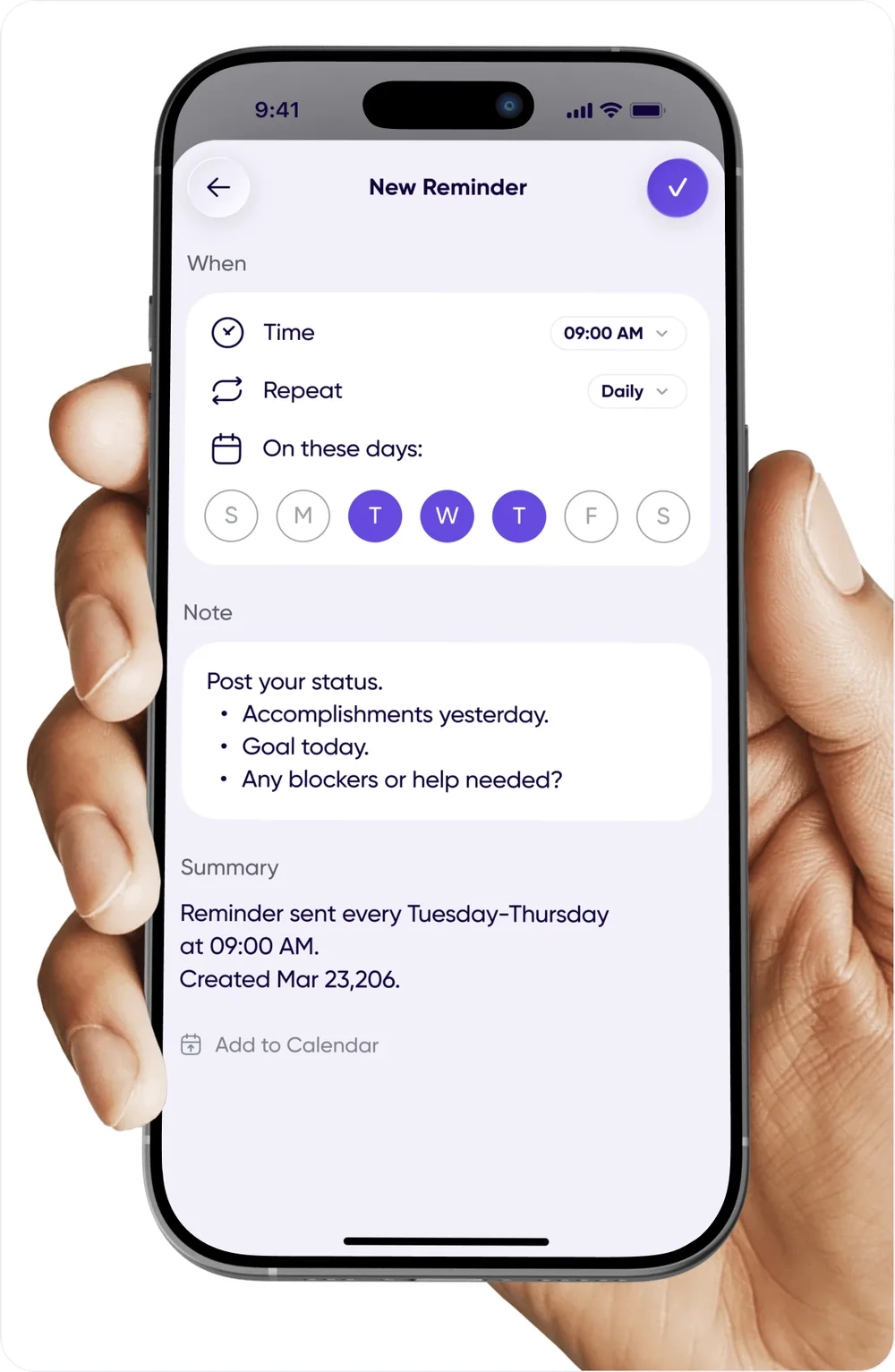
<p><img decoding="async" loading="lazy" alt="A reminder posting a scheduled prompt into a conversation" src="https://help.carbonvoice.app/assets/images/reminders-how-it-works-9af4a4553c3e82b446333d020a62dc1b.webp" width="1000" height="1000" class="img_ev3q"></p>
<h2 class="anchor anchorTargetStickyNavbar_Vzrq" id="how-to-set-one-up">How to set one up<a href="https://help.carbonvoice.app/whats-new/2026/03/24/stop-scheduling-start-reminding#how-to-set-one-up" class="hash-link" aria-label="Direct link to How to set one up" title="Direct link to How to set one up" translate="no">​</a></h2>
<p>It takes a few taps.</p>
<p><img decoding="async" loading="lazy" alt="Creating a reminder from conversation settings" src="https://help.carbonvoice.app/assets/images/reminders-setup-c3ce6b0c43af1e590675f2645c86c5bc.webp" width="1000" height="1533" class="img_ev3q"></p>
<ul>
<li class=""><strong>New conversations</strong> — tap <strong>Reminders</strong> at the top of the conversation information block.</li>
<li class=""><strong>Existing conversations</strong> — tap the conversation name to open Settings, scroll to
<strong>Reminders</strong>, and create one there.</li>
</ul>
<h2 class="anchor anchorTargetStickyNavbar_Vzrq" id="what-teams-are-replacing">What teams are replacing<a href="https://help.carbonvoice.app/whats-new/2026/03/24/stop-scheduling-start-reminding#what-teams-are-replacing" class="hash-link" aria-label="Direct link to What teams are replacing" title="Direct link to What teams are replacing" translate="no">​</a></h2>
<p><strong>Daily stand-up.</strong> <em>"What are you working on today?"</em> — posts every morning at 9am.</p>
<p><strong>Weekly 1:1.</strong> <em>"How are you? Wins, blockers, and what do you need from me?"</em> — every Friday
afternoon.</p>
<p><strong>Weekly kickoff.</strong> <em>"What do you want to accomplish this week? Do you need anything from
anyone?"</em> — every Monday at 8am.</p>
<p><strong>Week review.</strong> <em>"What got done this week, and what's carrying over?"</em> — every Friday at 4pm.</p>
<p><strong>Client check-in.</strong> <em>"Project status update."</em> — the 15th of every month keeps stakeholders on
a cadence.</p>
<p><strong>Team rituals.</strong> Monday motivation, Friday wins, end-of-month reflections, appreciation
callouts.</p>
<h2 class="anchor anchorTargetStickyNavbar_Vzrq" id="see-it-in-action">See it in action<a href="https://help.carbonvoice.app/whats-new/2026/03/24/stop-scheduling-start-reminding#see-it-in-action" class="hash-link" aria-label="Direct link to See it in action" title="Direct link to See it in action" translate="no">​</a></h2>
<p>We run our own daily stand-up async, same time every day, no meeting. You can see how it's set
up and take the template:
<a href="https://www.getcarbon.app/post/a-better-standup-doing-async-at-the-same-moment-in-time" target="_blank" rel="noopener noreferrer" class="">A better standup</a>.</p>]]></content>
        <author>
            <name>The Carbon Voice Team</name>
            <uri>https://getcarbon.app</uri>
        </author>
        <category label="release" term="release"/>
        <category label="conversations" term="conversations"/>
        <category label="reminders" term="reminders"/>
    </entry>
    <entry>
        <title type="html"><![CDATA[Smarter message tracking]]></title>
        <id>https://help.carbonvoice.app/whats-new/2026/03/23/smarter-message-tracking</id>
        <link href="https://help.carbonvoice.app/whats-new/2026/03/23/smarter-message-tracking"/>
        <updated>2026-03-23T00:00:00.000Z</updated>
        <summary type="html"><![CDATA[A What's New line that works like other messaging apps, Listen Later for messages you can't get to yet, and pre-recorded messages folded into voice memos.]]></summary>
        <content type="html"><![CDATA[<p>This update reworks how you find new messages and mark them read, upgrades replying with a
saved recording, and brings a batch of performance work.</p>
<p>📺 <a href="https://youtube.com/shorts/KrBqYrqSVmo" target="_blank" rel="noopener noreferrer" class="">Watch: finding new messages and Listen Later</a></p>
<h2 class="anchor anchorTargetStickyNavbar_Vzrq" id="the-whats-new-line">The What's New line<a href="https://help.carbonvoice.app/whats-new/2026/03/23/smarter-message-tracking#the-whats-new-line" class="hash-link" aria-label="Direct link to The What's New line" title="Direct link to The What's New line" translate="no">​</a></h2>
<p>A recurring piece of feedback was that messages didn't seem to clear notifications
consistently. So "read" and "unread" are now a single line, which should feel familiar from
other messaging apps.</p>
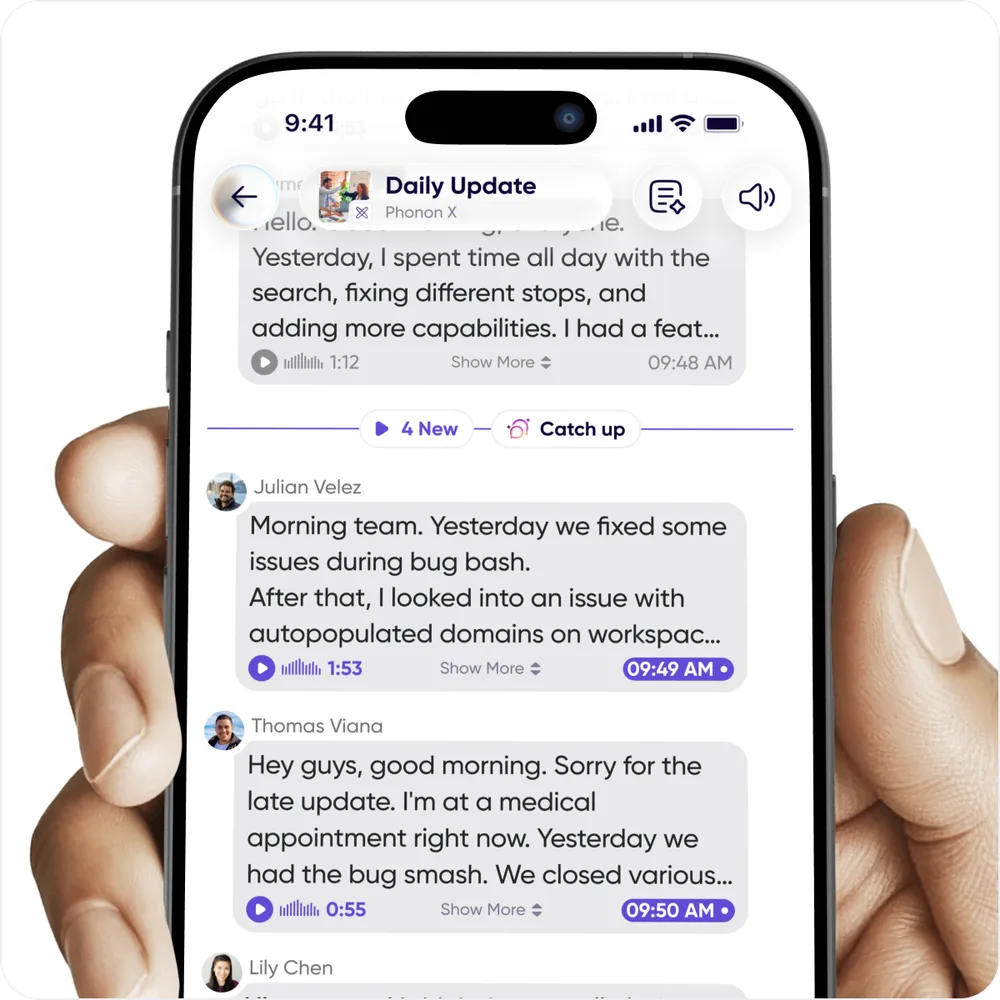
<p>Open a conversation and it scrolls to where you left off, with a line marking what's new.
Everything above the line is read; everything below it is unread. When you leave, the line
moves automatically based on what you've seen.</p>
<p><img decoding="async" loading="lazy" alt="A conversation with a line marking where the new messages start" src="https://help.carbonvoice.app/assets/images/whats-new-line-9944b85fd1bd1bd7f58a55f9cb16f060.webp" width="1000" height="1000" class="img_ev3q"></p>
<ul>
<li class=""><strong>Move it yourself</strong> by pressing and holding a message and selecting <strong>mark as unread</strong>.</li>
<li class=""><strong>Play everything unread</strong> with the play button in the lower left — the line moves when it
finishes.</li>
<li class=""><strong>Summarize what's new</strong> with the <strong>Catch-up</strong> button on the line itself.</li>
</ul>
<h2 class="anchor anchorTargetStickyNavbar_Vzrq" id="listen-later">Listen Later<a href="https://help.carbonvoice.app/whats-new/2026/03/23/smarter-message-tracking#listen-later" class="hash-link" aria-label="Direct link to Listen Later" title="Direct link to Listen Later" translate="no">​</a></h2>
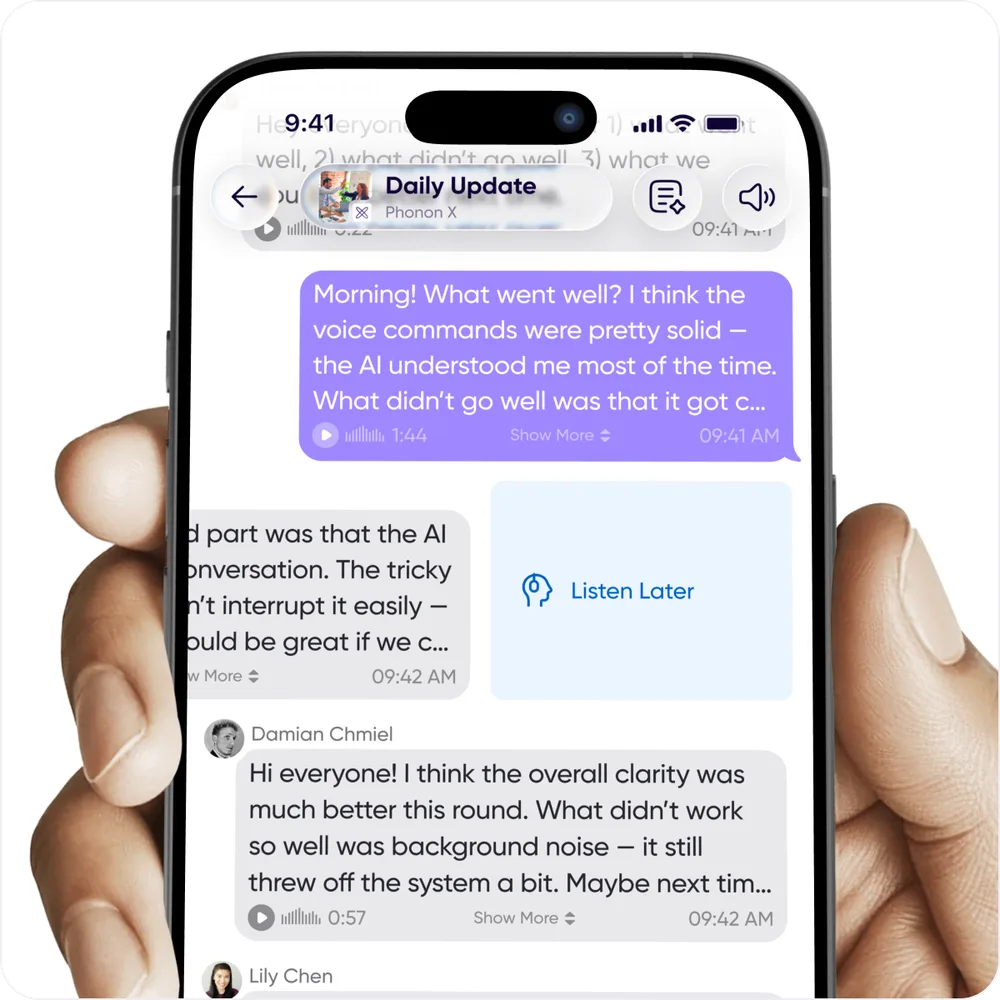
<p>You can't always listen to a long voice message the moment it arrives. A long swipe from
right to left labels a message <strong>Listen Later</strong> so it's easy to find again.</p>
<p><img decoding="async" loading="lazy" alt="Long-swiping a message to label it Listen Later" src="https://help.carbonvoice.app/assets/images/listen-later-45c8f0d3ce1193b1129785553a0c3a8b.webp" width="1000" height="1000" class="img_ev3q"></p>
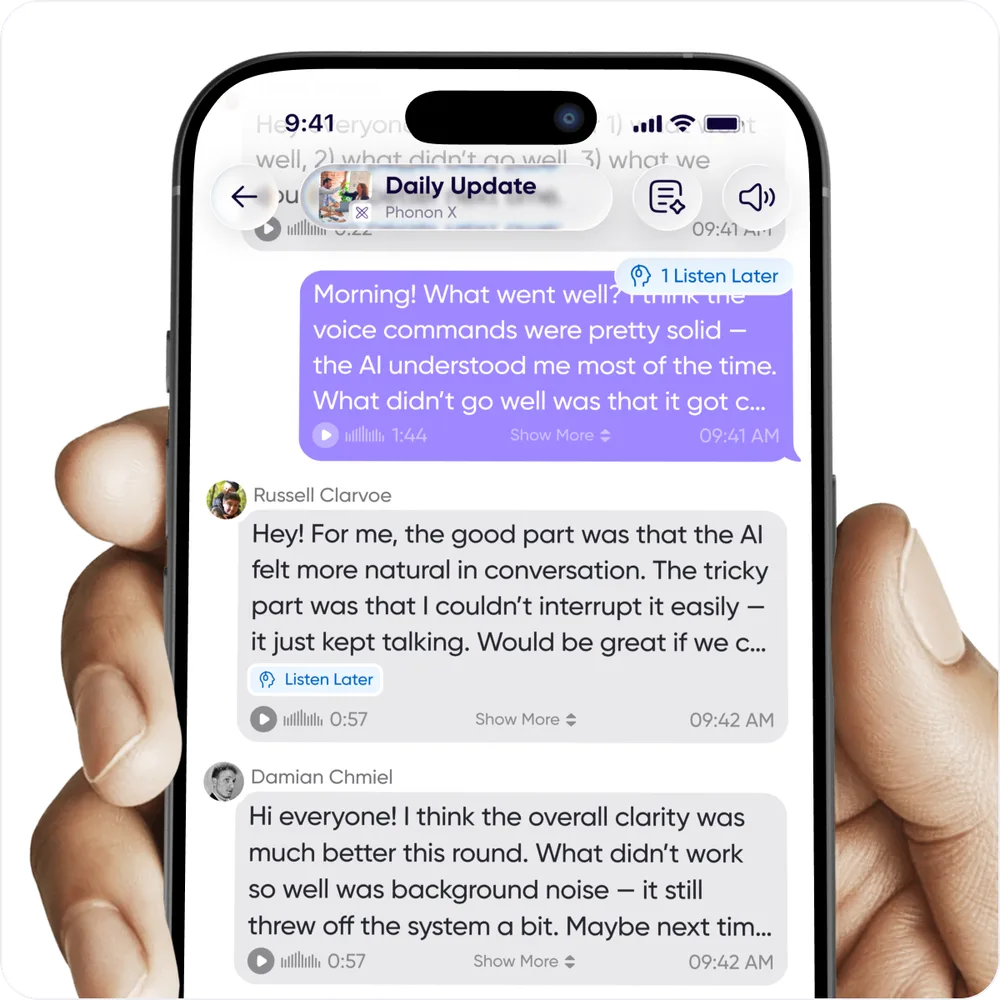
<p>An indicator at the top of the conversation shows when you have messages saved for later.
Tap <strong>Listen Later</strong> and you get arrows to move between them.</p>
<p><img decoding="async" loading="lazy" alt="The Listen Later indicator at the top of a conversation" src="https://help.carbonvoice.app/assets/images/listen-later-indicator-23e4816aabd52ab96f60eda643165c70.webp" width="1000" height="1000" class="img_ev3q"></p>
<h2 class="anchor anchorTargetStickyNavbar_Vzrq" id="catch-up-on-a-walk">Catch up on a walk<a href="https://help.carbonvoice.app/whats-new/2026/03/23/smarter-message-tracking#catch-up-on-a-walk" class="hash-link" aria-label="Direct link to Catch up on a walk" title="Direct link to Catch up on a walk" translate="no">​</a></h2>
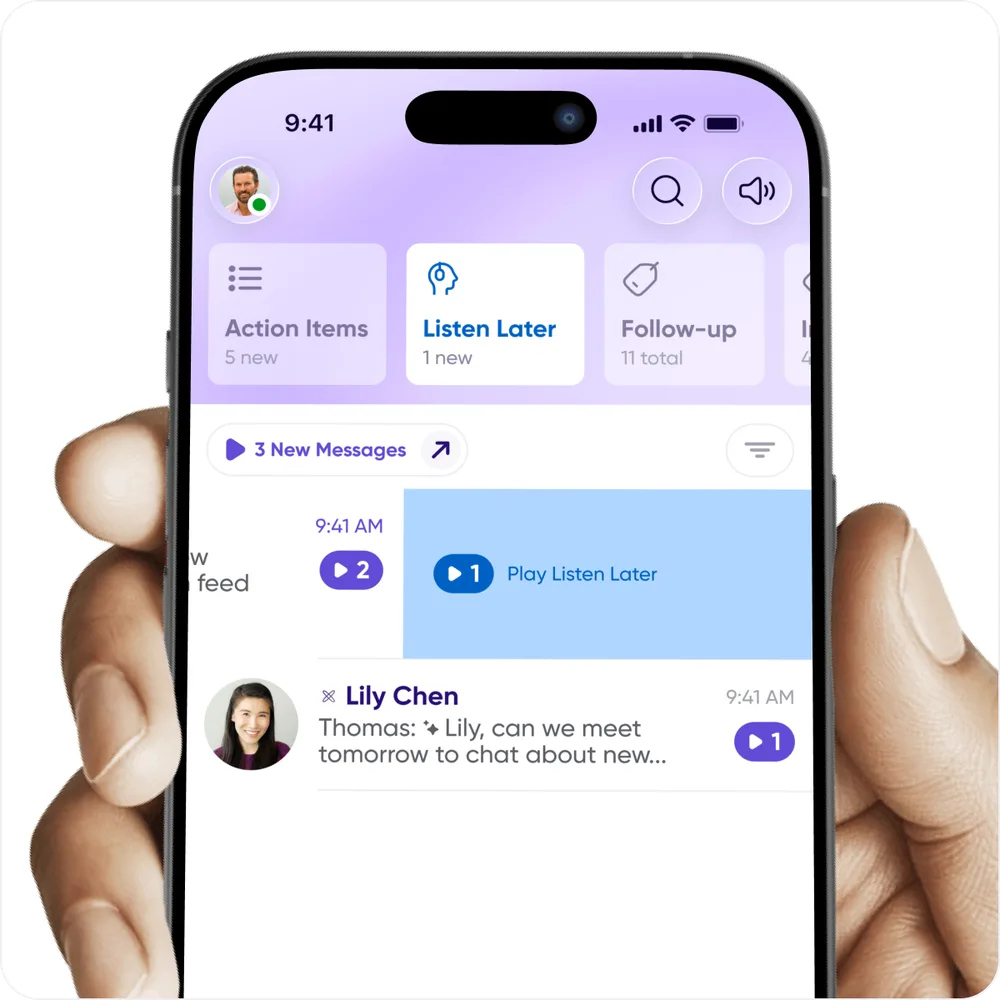
<p>A morning walk or commute is a good time to clear the backlog. Long-swipe from right to left
to play all your Listen Later messages along with the new ones — the normal play button always
plays new messages only.</p>
<p>Tap the filter button above the conversation list to see the conversations that need your
attention.</p>
<p><img decoding="async" loading="lazy" alt="Filtering the conversation list down to what needs attention" src="https://help.carbonvoice.app/assets/images/catch-up-filter-99768ae42738aaef7bf8bbfd96fe989a.webp" width="1000" height="1000" class="img_ev3q"></p>
<h2 class="anchor anchorTargetStickyNavbar_Vzrq" id="send-from-voice-memos">Send from voice memos<a href="https://help.carbonvoice.app/whats-new/2026/03/23/smarter-message-tracking#send-from-voice-memos" class="hash-link" aria-label="Direct link to Send from voice memos" title="Direct link to Send from voice memos" translate="no">​</a></h2>
<p>Pre-recorded messages have been replaced by the ability to reply and send from voice memos,
which improves stability and removes some redundant functionality. You can still:</p>
<ul>
<li class="">Save a sent message to use again — now <strong>Save to Voice Memos</strong>.</li>
<li class="">Reply to a message with something you already recorded — now <strong>Reply with Saved Voice
Memo</strong>.</li>
</ul>
<p>The upside is that you can send from <em>any</em> voice memo, and organize saved messages into
folders.</p>
<p>If you used pre-recorded messages:</p>
<ol>
<li class="">Your existing ones are in a folder inside Voice Memos.</li>
<li class="">Zapier workflows that send a pre-recorded message still work, though we'd suggest pointing
them at the voice memo message ID instead.</li>
<li class="">If a saved message is missing, get in touch.</li>
</ol>
<h2 class="anchor anchorTargetStickyNavbar_Vzrq" id="other-updates">Other updates<a href="https://help.carbonvoice.app/whats-new/2026/03/23/smarter-message-tracking#other-updates" class="hash-link" aria-label="Direct link to Other updates" title="Direct link to Other updates" translate="no">​</a></h2>
<ul>
<li class="">📓 Notebook is reorganized for faster access to your information.</li>
<li class="">⚙️ The profile menu and settings make relevant information easier to find.</li>
<li class="">🌎 Translated messages are easier to identify.</li>
<li class="">✅ Performance and bug fixes were a major focus, with more coming.</li>
<li class="">👩‍💻 People are building some genuinely interesting integrations between AI agents and
Carbon Voice. For developer keys, go to
<a href="https://developer.carbonvoice.app/" target="_blank" rel="noopener noreferrer" class="">developer.carbonvoice.app</a>.</li>
</ul>]]></content>
        <author>
            <name>The Carbon Voice Team</name>
            <uri>https://getcarbon.app</uri>
        </author>
        <category label="release" term="release"/>
        <category label="playback" term="playback"/>
        <category label="voice-memos" term="voice-memos"/>
        <category label="performance" term="performance"/>
    </entry>
    <entry>
        <title type="html"><![CDATA[Web attachments and performance improvements]]></title>
        <id>https://help.carbonvoice.app/whats-new/2025/12/23/web-attachments-and-performance-improvements</id>
        <link href="https://help.carbonvoice.app/whats-new/2025/12/23/web-attachments-and-performance-improvements"/>
        <updated>2025-12-23T00:00:00.000Z</updated>
        <summary type="html"><![CDATA[File attachments on web, a lighter and faster mobile app, personal notes while you listen, and a quicker way to start a new message.]]></summary>
        <content type="html"><![CDATA[<p>Two clear top requests came out of our recent survey: file attachments on web, and better
performance on web and mobile. This release is mostly those two.</p>
<h2 class="anchor anchorTargetStickyNavbar_Vzrq" id="web-attachments">Web attachments<a href="https://help.carbonvoice.app/whats-new/2025/12/23/web-attachments-and-performance-improvements#web-attachments" class="hash-link" aria-label="Direct link to Web attachments" title="Direct link to Web attachments" translate="no">​</a></h2>
<p>The web app now supports file attachments. You can attach and send images, videos, and files
like a PDF, and download them from the web app too.</p>
<h2 class="anchor anchorTargetStickyNavbar_Vzrq" id="mobile-performance">Mobile performance<a href="https://help.carbonvoice.app/whats-new/2025/12/23/web-attachments-and-performance-improvements#mobile-performance" class="hash-link" aria-label="Direct link to Mobile performance" title="Direct link to Mobile performance" translate="no">​</a></h2>
<p>The app should feel lighter overall, for two reasons.</p>
<p><strong>The interface is more grouped.</strong> Related and relevant actions now sit together, which makes
them faster to find — you'll notice it most during playback and recording.</p>
<p><strong>It's faster.</strong> We sped up key actions under the hood, especially once your contacts or
conversations have grown a lot, and improved a number of places where a weak network
connection caused slowness. More is on the way.</p>
<p>If you spot anything slow or buggy, tell us through <strong>Help → Support</strong>.</p>
<h2 class="anchor anchorTargetStickyNavbar_Vzrq" id="also-in-this-release">Also in this release<a href="https://help.carbonvoice.app/whats-new/2025/12/23/web-attachments-and-performance-improvements#also-in-this-release" class="hash-link" aria-label="Direct link to Also in this release" title="Direct link to Also in this release" translate="no">​</a></h2>
<ul>
<li class=""><strong>Starting new messages.</strong> Existing conversations now appear in the <strong>+</strong> in the lower
right, making it the fastest way to send a message to a person or an existing conversation.</li>
<li class=""><strong>Personal notes.</strong> Listening to a message and want to remember several things to say? Take
private notes in the message details, and you'll see them in the conversation when you
reply.</li>
<li class=""><strong>Apple Watch.</strong> There's an
<a href="https://youtube.com/shorts/urx2uBXdyLI" target="_blank" rel="noopener noreferrer" class="">updated video</a> on capturing ideas from your wrist.</li>
</ul>
<h2 class="anchor anchorTargetStickyNavbar_Vzrq" id="two-async-podcasts">Two async podcasts<a href="https://help.carbonvoice.app/whats-new/2025/12/23/web-attachments-and-performance-improvements#two-async-podcasts" class="hash-link" aria-label="Direct link to Two async podcasts" title="Direct link to Two async podcasts" translate="no">​</a></h2>
<p>Ari Meisel finished his first two <a class="" href="https://help.carbonvoice.app/whats-new/2025/12/15/the-first-async-podcast">async podcast</a>
experiments:</p>
<ul>
<li class="">🎧 <a href="https://carbonvoice.app/c/69050440b73dc2bd6e96a54a" target="_blank" rel="noopener noreferrer" class="">Rick Smith, CEO of Axon</a></li>
<li class="">🎧 <a href="https://carbonvoice.app/c/6908afe092da730040e8a178" target="_blank" rel="noopener noreferrer" class="">Nick Holzherr, CEO of GitLaw</a></li>
</ul>]]></content>
        <author>
            <name>The Carbon Voice Team</name>
            <uri>https://getcarbon.app</uri>
        </author>
        <category label="release" term="release"/>
        <category label="attachments" term="attachments"/>
        <category label="performance" term="performance"/>
        <category label="web" term="web"/>
    </entry>
    <entry>
        <title type="html"><![CDATA[The first async podcast]]></title>
        <id>https://help.carbonvoice.app/whats-new/2025/12/15/the-first-async-podcast</id>
        <link href="https://help.carbonvoice.app/whats-new/2025/12/15/the-first-async-podcast"/>
        <updated>2025-12-15T00:00:00.000Z</updated>
        <summary type="html"><![CDATA[Ari Meisel interviewed Axon CEO Rick Smith across 30 days inside a Carbon Voice conversation, and shared the raw result rather than editing it into a linear episode.]]></summary>
        <content type="html"><![CDATA[<p>We love hearing how Carbon Voice lets conversations take a new shape once scheduling and
coordination stop being constraints. Usually that's about eliminating calls and meetings.
Sometimes it's a kind of conversation that wasn't possible before — which is what this is.</p>
<h2 class="anchor anchorTargetStickyNavbar_Vzrq" id="the-idea">The idea<a href="https://help.carbonvoice.app/whats-new/2025/12/15/the-first-async-podcast#the-idea" class="hash-link" aria-label="Direct link to The idea" title="Direct link to The idea" translate="no">​</a></h2>
<p>Ari Meisel had an observation: podcasts are often performative, because the time constraints
of the format push interviewees toward rehearsed answers instead of giving them room to think
and explore an idea properly. He
<a href="https://www.linkedin.com/pulse/asynchronous-podcast-why-future-deep-conversation-might-ari-meisel-ezyic/" target="_blank" rel="noopener noreferrer" class="">wrote about the async podcast</a>
— a conversation captured over time in Carbon Voice.</p>
<p>His first guest was Rick Smith, CEO of Axon. They covered the story of Axon, the technology,
the approach to AI, and a lot of lessons about leadership and scale — nearly three hours of
content over 30 days.</p>
<h2 class="anchor anchorTargetStickyNavbar_Vzrq" id="listen">Listen<a href="https://help.carbonvoice.app/whats-new/2025/12/15/the-first-async-podcast#listen" class="hash-link" aria-label="Direct link to Listen" title="Direct link to Listen" translate="no">​</a></h2>
<p>Instead of cutting it into a traditional linear episode, Ari and Rick shared access to the
raw conversation, transcripts and summaries included, so you can see how it actually
unfolded.</p>
<p>🎧 <a href="https://carbonvoice.app/c/69050440b73dc2bd6e96a54a" target="_blank" rel="noopener noreferrer" class="">Listen here</a></p>
<h2 class="anchor anchorTargetStickyNavbar_Vzrq" id="other-ways-to-use-this-structure">Other ways to use this structure<a href="https://help.carbonvoice.app/whats-new/2025/12/15/the-first-async-podcast#other-ways-to-use-this-structure" class="hash-link" aria-label="Direct link to Other ways to use this structure" title="Direct link to Other ways to use this structure" translate="no">​</a></h2>
<p>People have already asked about adapting it:</p>
<ul>
<li class=""><strong>Internal sharing</strong> — two team members discussing a new feature or launch, shared with
everyone else, like an internal podcast.</li>
<li class=""><strong>Closed external sharing</strong> — like a public podcast, but only for customers you add.</li>
</ul>
<p>More are in the works.</p>]]></content>
        <author>
            <name>The Carbon Voice Team</name>
            <uri>https://getcarbon.app</uri>
        </author>
        <category label="community" term="community"/>
    </entry>
    <entry>
        <title type="html"><![CDATA[Make your text messages sound like you]]></title>
        <id>https://help.carbonvoice.app/whats-new/2025/11/04/make-your-text-messages-sound-like-you</id>
        <link href="https://help.carbonvoice.app/whats-new/2025/11/04/make-your-text-messages-sound-like-you"/>
        <updated>2025-11-04T00:00:00.000Z</updated>
        <summary type="html"><![CDATA[Clone your voice so the text messages you send play back in your own voice instead of a default text-to-speech one.]]></summary>
        <content type="html"><![CDATA[<p>By default, a text message you send plays back to the other person in a standard
text-to-speech voice. Clone your voice and it sounds like you spoke it instead.</p>
<h2 class="anchor anchorTargetStickyNavbar_Vzrq" id="why-use-it">Why use it<a href="https://help.carbonvoice.app/whats-new/2025/11/04/make-your-text-messages-sound-like-you#why-use-it" class="hash-link" aria-label="Direct link to Why use it" title="Direct link to Why use it" translate="no">​</a></h2>
<ul>
<li class="">Makes it easy to tell who said what in a conversation.</li>
<li class="">Builds trust and clarity by using your own voice.</li>
<li class="">Works for both text messages and translated messages.</li>
</ul>
<h2 class="anchor anchorTargetStickyNavbar_Vzrq" id="how-to-turn-it-on">How to turn it on<a href="https://help.carbonvoice.app/whats-new/2025/11/04/make-your-text-messages-sound-like-you#how-to-turn-it-on" class="hash-link" aria-label="Direct link to How to turn it on" title="Direct link to How to turn it on" translate="no">​</a></h2>
<ol>
<li class="">Open the profile menu.</li>
<li class="">Tap <strong>Global Voice</strong>.</li>
<li class="">Under <strong>Text-to-Speech</strong>, tap <strong>+ Clone My Voice</strong> and follow the prompts to record a
short sample.</li>
<li class="">Turn <strong>Voice Cloning</strong> on.</li>
</ol>
<p>You can switch between your cloned voice and standard text-to-speech at any time in Global
Voice.</p>
<h2 class="anchor anchorTargetStickyNavbar_Vzrq" id="how-it-works">How it works<a href="https://help.carbonvoice.app/whats-new/2025/11/04/make-your-text-messages-sound-like-you#how-it-works" class="hash-link" aria-label="Direct link to How it works" title="Direct link to How it works" translate="no">​</a></h2>
<ul>
<li class="">Text you send plays back in your voice.</li>
<li class="">Translated messages use your voice too.</li>
<li class="">With voice cloning off, it falls back to the standard text-to-speech voice you selected.</li>
<li class="">You can delete your voice profile at any time from Global Voice.</li>
</ul>
<p>See <a class="" href="https://help.carbonvoice.app/voice-and-language/voice-cloning">Voice cloning</a> for the full documentation.</p>]]></content>
        <author>
            <name>The Carbon Voice Team</name>
            <uri>https://getcarbon.app</uri>
        </author>
        <category label="release" term="release"/>
        <category label="ai" term="ai"/>
        <category label="voice-cloning" term="voice-cloning"/>
    </entry>
    <entry>
        <title type="html"><![CDATA[Connect ChatGPT to Carbon Voice]]></title>
        <id>https://help.carbonvoice.app/whats-new/2025/10/27/connect-chatgpt-to-carbon-voice</id>
        <link href="https://help.carbonvoice.app/whats-new/2025/10/27/connect-chatgpt-to-carbon-voice"/>
        <updated>2025-10-27T00:00:00.000Z</updated>
        <summary type="html"><![CDATA[Connect Carbon Voice to ChatGPT and ask it to turn your voice memos and conversations into blog posts, plans, and structured documentation.]]></summary>
        <content type="html"><![CDATA[<p>You can now connect ChatGPT to Carbon Voice. Capture a voice memo on the go, then open
ChatGPT and ask it to "turn my last voice memo into a blog post." Or turn a whole
conversation into structured documentation: "Turn our conversation 'Acme Investment' into an
investment memo."</p>
<p><img decoding="async" loading="lazy" alt="ChatGPT answering a question using Carbon Voice conversations" src="https://help.carbonvoice.app/assets/images/chatgpt-connection-4daba1cdb95b490a346d429b2ffc8509.webp" width="1000" height="525" class="img_ev3q"></p>
<p>📺 <a href="https://www.youtube.com/watch?v=69UKDMW_Sy4" target="_blank" rel="noopener noreferrer" class="">Watch: ChatGPT and Carbon Voice</a></p>
<h2 class="anchor anchorTargetStickyNavbar_Vzrq" id="setting-up-the-connection">Setting up the connection<a href="https://help.carbonvoice.app/whats-new/2025/10/27/connect-chatgpt-to-carbon-voice#setting-up-the-connection" class="hash-link" aria-label="Direct link to Setting up the connection" title="Direct link to Setting up the connection" translate="no">​</a></h2>
<ol>
<li class="">Go to <strong>Apps and Connections</strong> in ChatGPT settings.</li>
<li class="">Hit <strong>Create</strong> in the top right. You may need to turn on <strong>Advanced Settings → Developer
Mode</strong> from the bottom of the page first.</li>
<li class="">Add <strong>Carbon Voice</strong> with the URL <code>https://mcp.carbonvoice.app</code>.</li>
<li class="">Accept the disclaimers and you're ready.</li>
</ol>
<p>Two videos that help: <a href="https://www.youtube.com/watch?v=OR728zFpP6Q" target="_blank" rel="noopener noreferrer" class="">accessing Carbon Voice in
ChatGPT</a> and the <a href="https://www.youtube.com/watch?v=kxpbtK68RwM" target="_blank" rel="noopener noreferrer" class="">ChatGPT admin guide for
turning on access</a>.</p>
<h2 class="anchor anchorTargetStickyNavbar_Vzrq" id="using-it">Using it<a href="https://help.carbonvoice.app/whats-new/2025/10/27/connect-chatgpt-to-carbon-voice#using-it" class="hash-link" aria-label="Direct link to Using it" title="Direct link to Using it" translate="no">​</a></h2>
<p>Type <code>@carbon</code> in the input field to ask about information from Carbon Voice. A few ideas:</p>
<ul>
<li class=""><em>"Turn my last voice memo into a blog post."</em></li>
<li class=""><em>"Turn the discussion in the 'Marketing Plan' conversation into a draft plan."</em></li>
<li class=""><em>"Based on the discussion in 'Daily Standup', what is everyone working on?"</em></li>
<li class=""><em>"Which conversations is Fred talking about MCP servers in?"</em></li>
</ul>
<h2 class="anchor anchorTargetStickyNavbar_Vzrq" id="works-with-other-ai-agents">Works with other AI agents<a href="https://help.carbonvoice.app/whats-new/2025/10/27/connect-chatgpt-to-carbon-voice#works-with-other-ai-agents" class="hash-link" aria-label="Direct link to Works with other AI agents" title="Direct link to Works with other AI agents" translate="no">​</a></h2>
<p>Using Claude, Cursor, or something else? See the <a class="" href="https://help.carbonvoice.app/ai-assistants">MCP documentation</a> for
setup. And with the <a class="" href="https://help.carbonvoice.app/whats-new/2025/10/27/previewing-carbon-voice-3-0">3.0 preview</a> you can chat
with AI about a conversation without leaving Carbon Voice at all.</p>
<p>See <a class="" href="https://help.carbonvoice.app/ai-assistants/chatgpt">ChatGPT</a> for the full documentation.</p>]]></content>
        <author>
            <name>The Carbon Voice Team</name>
            <uri>https://getcarbon.app</uri>
        </author>
        <category label="release" term="release"/>
        <category label="integrations" term="integrations"/>
        <category label="mcp" term="mcp"/>
        <category label="ai" term="ai"/>
    </entry>
    <entry>
        <title type="html"><![CDATA[Previewing Carbon Voice 3.0]]></title>
        <id>https://help.carbonvoice.app/whats-new/2025/10/27/previewing-carbon-voice-3-0</id>
        <link href="https://help.carbonvoice.app/whats-new/2025/10/27/previewing-carbon-voice-3-0"/>
        <updated>2025-10-27T00:00:00.000Z</updated>
        <summary type="html"><![CDATA[Our biggest update yet, in preview — AI Chat for querying your conversations, Action Items that track what was decided, and Notebook as a home for everything discussed.]]></summary>
        <content type="html"><![CDATA[<p><strong>Carbon Voice 3.0</strong> is our biggest update yet, available now in preview.</p>
<p>Every conversation holds context, decisions, and next steps — and too often they're lost.
3.0 turns talk into insight, action, and knowledge, so a conversation becomes living
documentation and clear next steps instead of ending. Three new tools make that work: <strong>AI
Chat</strong>, <strong>Action Items</strong>, and <strong>Notebook</strong>.</p>
<h2 class="anchor anchorTargetStickyNavbar_Vzrq" id="ai-chat">AI Chat<a href="https://help.carbonvoice.app/whats-new/2025/10/27/previewing-carbon-voice-3-0#ai-chat" class="hash-link" aria-label="Direct link to AI Chat" title="Direct link to AI Chat" translate="no">​</a></h2>
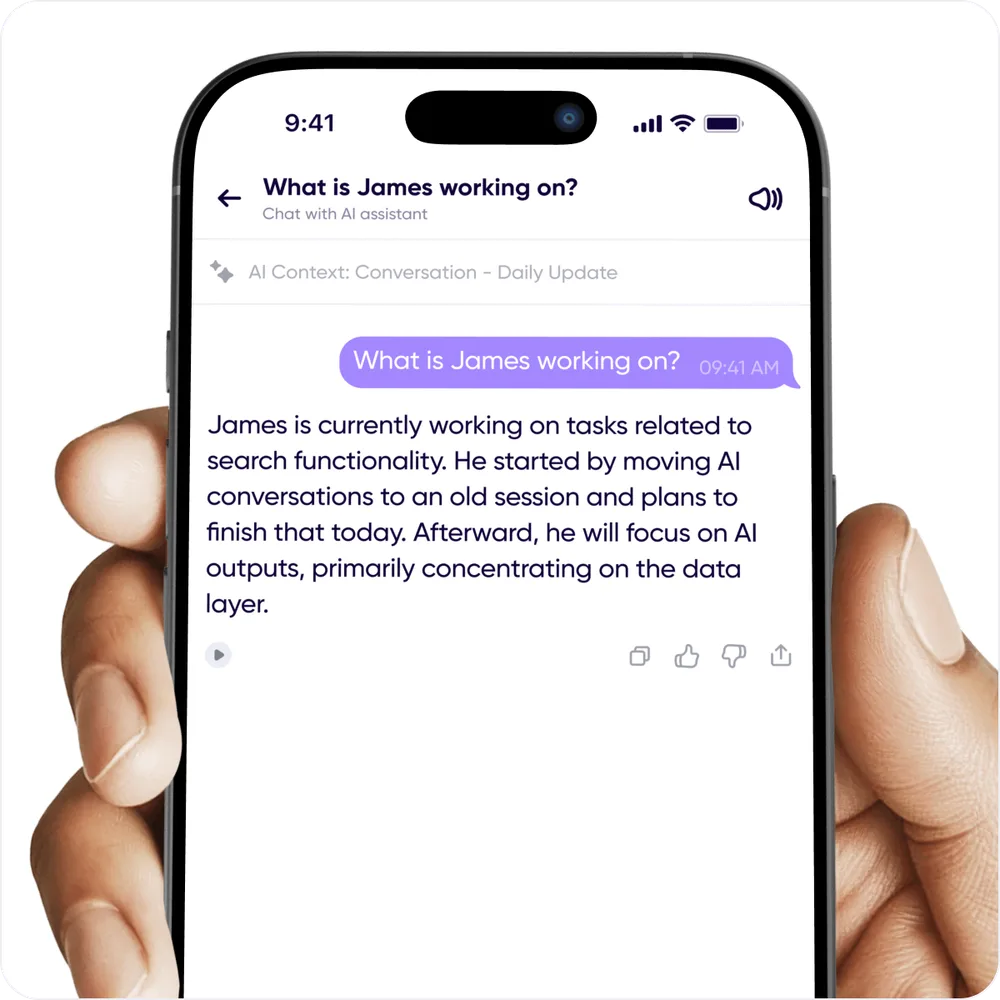
<p>Search and ask questions about your conversations and voice memos in a ChatGPT-style
interface. Things like:</p>
<ul>
<li class=""><em>"What is James working on?"</em></li>
<li class=""><em>"Is the team blocked by anything?"</em></li>
<li class=""><em>"Create a marketing plan from this conversation."</em></li>
</ul>
<p><img decoding="async" loading="lazy" alt="AI Chat answering a question about a conversation" src="https://help.carbonvoice.app/assets/images/ai-chat-a83828995648a60f9f229aa5b0140a66.webp" width="1000" height="1000" class="img_ev3q"></p>
<p>Your conversations become a knowledge base you can query.</p>
<p>You reach AI Chat with the multi-color chat icon in the lower right of a conversation, a
voice memo, or Home — and where you open it decides its scope:</p>
<ul>
<li class=""><strong>From a conversation</strong> — focused on that conversation. Your previous chats about it live
in the same place.</li>
<li class=""><strong>From a voice memo</strong> — answers only from that memo. This history lives in global AI Chat.</li>
<li class=""><strong>From a multi-select</strong> — select several messages or memos and the answer draws only on
those.</li>
<li class=""><strong>From Home</strong> — global AI Chat answers across all your conversations and voice memos in a
workspace, and holds the history of previous global chats and voice memo chats.</li>
</ul>
<p>AI Chats are constrained to a single workspace, fixed when the chat starts. Results vary
with the number of messages and how the prompt is structured — tell us when something
doesn't match what you expected.</p>
<h2 class="anchor anchorTargetStickyNavbar_Vzrq" id="action-items">Action Items<a href="https://help.carbonvoice.app/whats-new/2025/10/27/previewing-carbon-voice-3-0#action-items" class="hash-link" aria-label="Direct link to Action Items" title="Direct link to Action Items" translate="no">​</a></h2>
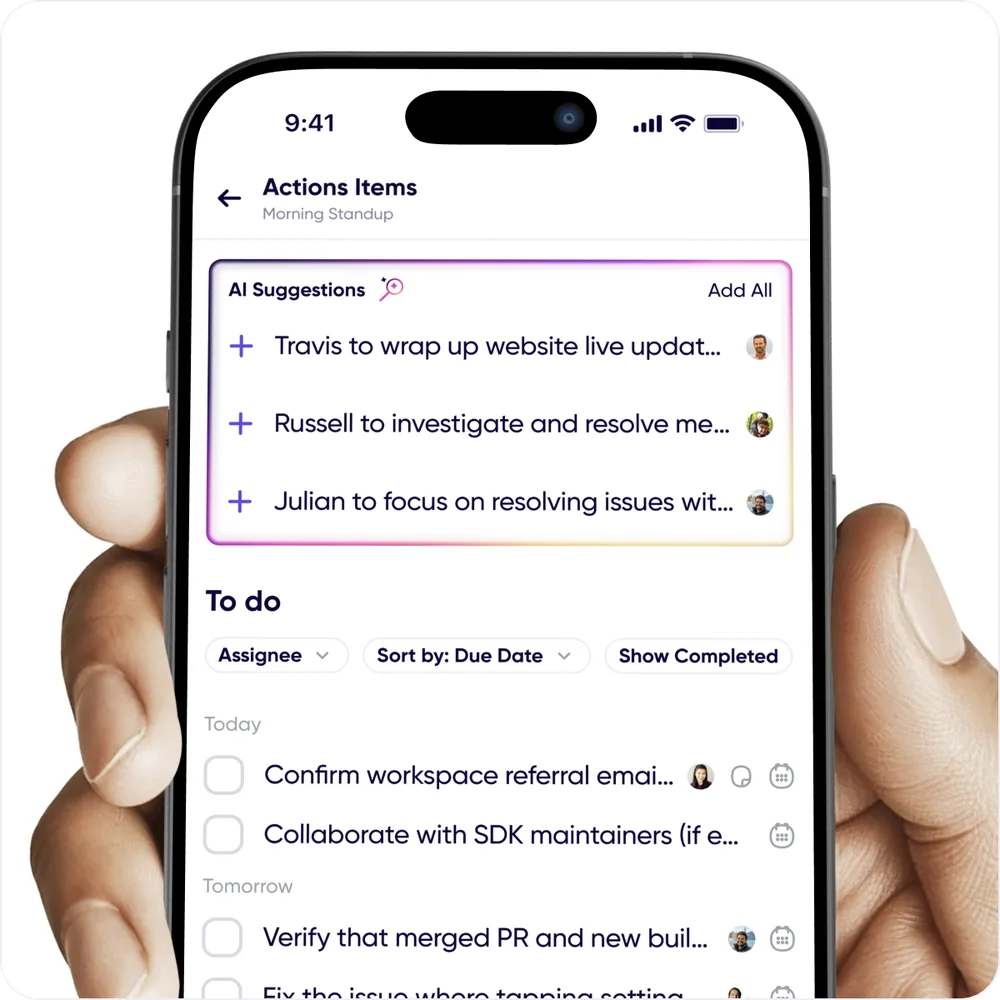
<p>AI finds the key takeaways in conversations and voice memos and turns them into a trackable
to-do list. Assign them, mark them complete, or push them to Asana, Notion, or whatever
project manager you already use with the <a class="" href="https://help.carbonvoice.app/integrations/zapier">Zapier integration</a>.</p>
<p><img decoding="async" loading="lazy" alt="A trackable list of action items pulled out of a conversation" src="https://help.carbonvoice.app/assets/images/action-items-52a419a00131e747488817a94788dc12.webp" width="1000" height="1000" class="img_ev3q"></p>
<ul>
<li class=""><strong>Find them</strong> by asking AI Chat to pull action items out of your conversations.</li>
<li class=""><strong>Conversation action items</strong> live behind AI Chat or Conversation Settings.</li>
<li class=""><strong>Create your own</strong> with the <strong>+</strong> on the Action Items screen.</li>
<li class=""><strong>Save them</strong> from a system prompt: prompts that generate action items, like Meeting
Summaries and To-do Lists, have a <strong>Save Action Items</strong> button.</li>
<li class=""><strong>My Action Items</strong> in Notebook holds everything assigned to you, plus anything you
created and haven't assigned.</li>
</ul>
<h2 class="anchor anchorTargetStickyNavbar_Vzrq" id="notebook">Notebook<a href="https://help.carbonvoice.app/whats-new/2025/10/27/previewing-carbon-voice-3-0#notebook" class="hash-link" aria-label="Direct link to Notebook" title="Direct link to Notebook" translate="no">​</a></h2>
<p>A command center for everything discussed. In one place:</p>
<ul>
<li class="">Voice memos — the home for messages you record outside a conversation</li>
<li class="">Action items assigned to you</li>
<li class="">Your contact list</li>
<li class="">Labeled messages — press and hold a message to set a label</li>
</ul>
<p>Personal notes and saved AI outputs — blog drafts, meeting summaries, strategy documents —
are coming.</p>
<h2 class="anchor anchorTargetStickyNavbar_Vzrq" id="30-is-just-the-beginning">3.0 is just the beginning<a href="https://help.carbonvoice.app/whats-new/2025/10/27/previewing-carbon-voice-3-0#30-is-just-the-beginning" class="hash-link" aria-label="Direct link to 3.0 is just the beginning" title="Direct link to 3.0 is just the beginning" translate="no">​</a></h2>
<p>The goal is simple: make every conversation automatically actionable, turning talk into
knowledge that moves work forward. Help shape what comes next from <strong>Profile → Help → Share
Feedback</strong>.</p>]]></content>
        <author>
            <name>The Carbon Voice Team</name>
            <uri>https://getcarbon.app</uri>
        </author>
        <category label="release" term="release"/>
        <category label="ai" term="ai"/>
        <category label="action-items" term="action-items"/>
        <category label="notebook" term="notebook"/>
    </entry>
    <entry>
        <title type="html"><![CDATA[Create your own AI prompts]]></title>
        <id>https://help.carbonvoice.app/whats-new/2025/10/01/create-your-own-ai-prompts</id>
        <link href="https://help.carbonvoice.app/whats-new/2025/10/01/create-your-own-ai-prompts"/>
        <updated>2025-10-01T00:00:00.000Z</updated>
        <summary type="html"><![CDATA[Write and save your own AI prompts to transform conversations and voice memos, and use them as Zapier triggers alongside the built-in ones.]]></summary>
        <content type="html"><![CDATA[<p>You can now write your own AI prompts to turn conversations and voice memos into whatever
structured output you need.</p>
<p>To create and save one:</p>
<ol>
<li class="">Go to any conversation.</li>
<li class="">Tap the AI Action icon in the lower right.</li>
<li class="">On the bottom row, tap <strong>+</strong> on the left.</li>
<li class="">Enter a title and your prompt, then save.</li>
</ol>
<p>Your custom prompt then works on any message or set of messages, right alongside the 40+
built-in prompts.</p>
<p>You can also use a custom prompt as a <a class="" href="https://help.carbonvoice.app/integrations/zapier">Zapier</a> trigger — select
<strong>User</strong> as the type and your prompt appears in the list.</p>]]></content>
        <author>
            <name>The Carbon Voice Team</name>
            <uri>https://getcarbon.app</uri>
        </author>
        <category label="release" term="release"/>
        <category label="ai" term="ai"/>
        <category label="zapier" term="zapier"/>
    </entry>
    <entry>
        <title type="html"><![CDATA[Connect your AI assistants with the MCP server]]></title>
        <id>https://help.carbonvoice.app/whats-new/2025/08/05/connect-your-ai-assistants-with-the-mcp-server</id>
        <link href="https://help.carbonvoice.app/whats-new/2025/08/05/connect-your-ai-assistants-with-the-mcp-server"/>
        <updated>2025-08-05T00:00:00.000Z</updated>
        <summary type="html"><![CDATA[Claude, Cursor, and other MCP clients can now read and analyze your Carbon Voice conversations and voice memos directly — no copy-pasting or exporting.]]></summary>
        <content type="html"><![CDATA[<p>If you use Carbon Voice alongside an AI assistant like Claude or Cursor, you can now ask
those tools to analyze and synthesize your conversations and voice memos <strong>directly</strong>. No
copy-pasting, no exporting — just context.</p>
<blockquote>
<p>At launch, Claude and Cursor are supported. ChatGPT support is coming, and Windsurf isn't
supported yet.</p>
</blockquote>
<p>It turns your conversations into a lightweight knowledge base, which makes it much easier
to reflect, recall, and act.</p>
<p>Things worth trying:</p>
<ul>
<li class="">"Turn my last voice memo in Carbon Voice into a blog post."</li>
<li class="">"Based on the Daily Update discussion in Carbon Voice, what is everyone working on? Is
anyone blocked?"</li>
<li class="">"In the Carbon Voice conversation with the XYZ team members, there's a discussion about a
bug. File it in Jira and assign it to a team member."</li>
<li class="">"How can I communicate better with a teammate, based on the messages I've sent them over
the past month?"</li>
</ul>
<p>This is a step toward what we're building for: every conversation becoming insight, action,
and relationship intelligence, effortlessly, from your pocket.</p>
<p>See the <a class="" href="https://help.carbonvoice.app/ai-assistants">MCP documentation</a> to get set up.</p>]]></content>
        <author>
            <name>The Carbon Voice Team</name>
            <uri>https://getcarbon.app</uri>
        </author>
        <category label="release" term="release"/>
        <category label="integrations" term="integrations"/>
        <category label="mcp" term="mcp"/>
        <category label="ai" term="ai"/>
    </entry>
    <entry>
        <title type="html"><![CDATA[A faster way for your team to join your workspace]]></title>
        <id>https://help.carbonvoice.app/whats-new/2025/07/17/a-faster-way-for-your-team-to-join-your-workspace</id>
        <link href="https://help.carbonvoice.app/whats-new/2025/07/17/a-faster-way-for-your-team-to-join-your-workspace"/>
        <updated>2025-07-17T00:00:00.000Z</updated>
        <summary type="html"><![CDATA[Connect your company domain to a workspace so anyone logging in with a matching email address discovers it — and choose whether they join automatically, request access, or follow your own instructions.]]></summary>
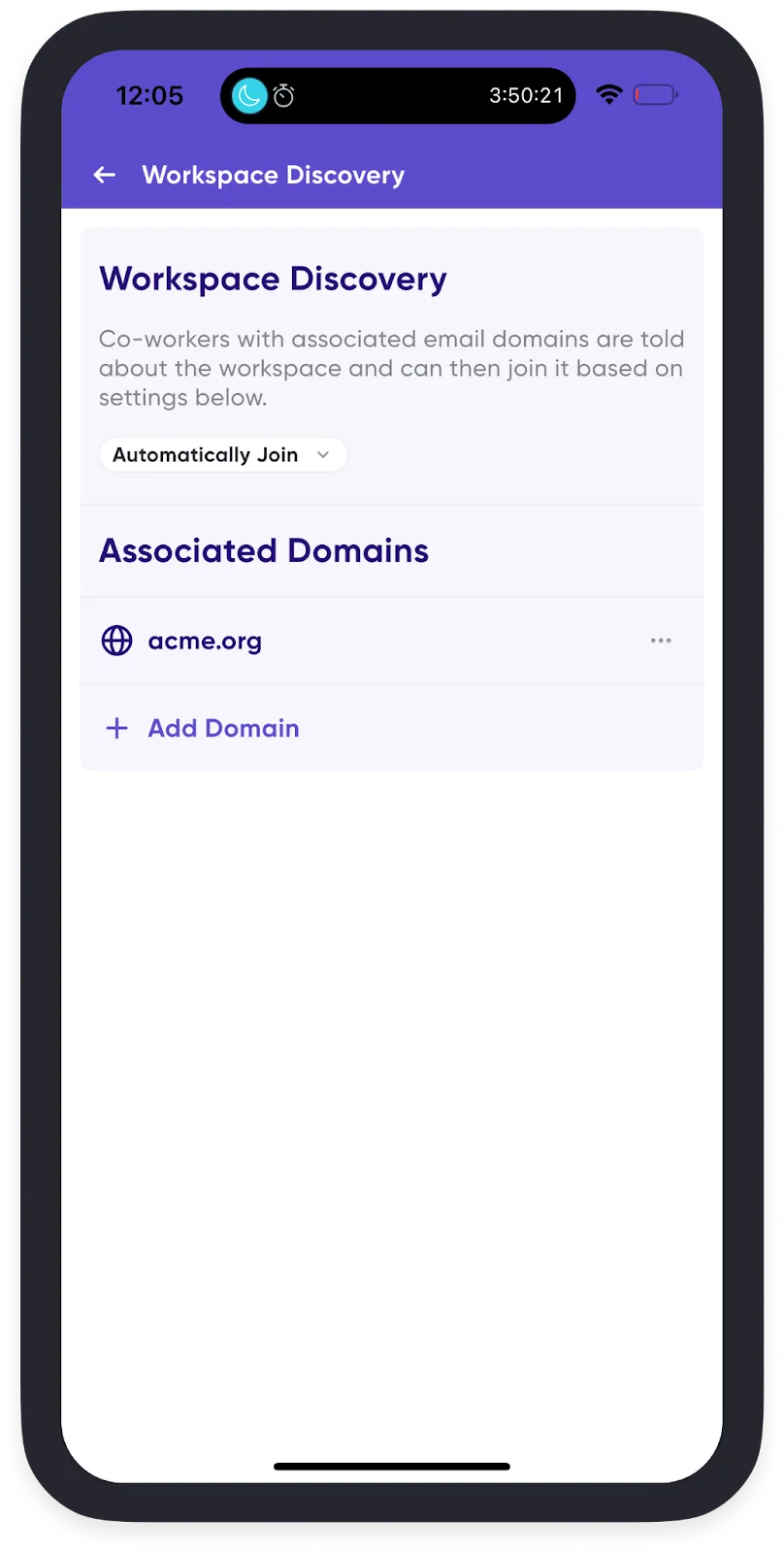
        <content type="html"><![CDATA[<p>You can now connect your company domain to a workspace, so anyone who logs in with a
matching email address discovers it — no links to hunt for and no invites to track down.</p>
<h2 class="anchor anchorTargetStickyNavbar_Vzrq" id="how-it-works">How it works<a href="https://help.carbonvoice.app/whats-new/2025/07/17/a-faster-way-for-your-team-to-join-your-workspace#how-it-works" class="hash-link" aria-label="Direct link to How it works" title="Direct link to How it works" translate="no">​</a></h2>
<p>Once you've connected your company domains to your workspace, anyone logging in with a
matching email domain is told the workspace exists. You choose what happens next:</p>
<ul>
<li class="">They <strong>join automatically</strong>.</li>
<li class="">They're <strong>prompted to request to join</strong>, and a workspace admin approves it.</li>
<li class="">They see <strong>custom instructions</strong> you've written — internal process notes, or links for
joining.</li>
</ul>
<p><img decoding="async" loading="lazy" alt="Workspace discovery settings for a connected company domain" src="https://help.carbonvoice.app/assets/images/workspace-discovery-40ee58e70722f41b1ce07966f61e2503.webp" width="808" height="1600" class="img_ev3q"></p>
<h2 class="anchor anchorTargetStickyNavbar_Vzrq" id="setting-it-up-for-a-new-workspace">Setting it up for a new workspace<a href="https://help.carbonvoice.app/whats-new/2025/07/17/a-faster-way-for-your-team-to-join-your-workspace#setting-it-up-for-a-new-workspace" class="hash-link" aria-label="Direct link to Setting it up for a new workspace" title="Direct link to Setting it up for a new workspace" translate="no">​</a></h2>
<p><a class="" href="https://help.carbonvoice.app/workspaces/create-a-workspace">Create a workspace</a>. Step 2 of creation walks you through
associating your company domains and choosing the setting.</p>
<h2 class="anchor anchorTargetStickyNavbar_Vzrq" id="setting-it-up-for-an-existing-workspace">Setting it up for an existing workspace<a href="https://help.carbonvoice.app/whats-new/2025/07/17/a-faster-way-for-your-team-to-join-your-workspace#setting-it-up-for-an-existing-workspace" class="hash-link" aria-label="Direct link to Setting it up for an existing workspace" title="Direct link to Setting it up for an existing workspace" translate="no">​</a></h2>
<ol>
<li class="">Open your <strong>Profile Menu</strong> in the bottom-right corner.</li>
<li class="">Tap <strong>Spaces</strong>, then tap the <strong>gear icon</strong> to the right of your workspace.</li>
<li class="">Select <strong>Admin Controls → Workspace Discovery</strong>.</li>
<li class="">Tap <strong>+</strong> to add a domain.</li>
<li class="">Choose how people with that domain can join:
<ul>
<li class=""><strong>Do not inform</strong> — manual adds only</li>
<li class=""><strong>Auto-join</strong></li>
<li class=""><strong>Request to join</strong></li>
<li class=""><strong>Show custom instructions</strong></li>
</ul>
</li>
</ol>
<p>See <a class="" href="https://help.carbonvoice.app/workspaces/connect-a-domain">Connect a domain</a> for the full documentation.</p>]]></content>
        <author>
            <name>The Carbon Voice Team</name>
            <uri>https://getcarbon.app</uri>
        </author>
        <category label="release" term="release"/>
        <category label="workspaces" term="workspaces"/>
        <category label="admin" term="admin"/>
    </entry>
    <entry>
        <title type="html"><![CDATA[Search messages and quick labels]]></title>
        <id>https://help.carbonvoice.app/whats-new/2025/06/25/search-messages-and-quick-labels</id>
        <link href="https://help.carbonvoice.app/whats-new/2025/06/25/search-messages-and-quick-labels"/>
        <updated>2025-06-25T00:00:00.000Z</updated>
        <summary type="html"><![CDATA[Search the transcript of every message to find what was said, and set a label on any message by pressing and holding it.]]></summary>
        <content type="html"><![CDATA[<p>Two features that make finding and organizing your messages much faster.</p>
<h2 class="anchor anchorTargetStickyNavbar_Vzrq" id="search-your-messages">Search your messages<a href="https://help.carbonvoice.app/whats-new/2025/06/25/search-messages-and-quick-labels#search-your-messages" class="hash-link" aria-label="Direct link to Search your messages" title="Direct link to Search your messages" translate="no">​</a></h2>
<p>Find any message by searching its transcript — just type your keywords.</p>
<ul>
<li class=""><strong>Across the app:</strong> from the Home screen, pull down or tap the search icon.</li>
<li class=""><strong>Within one conversation:</strong> open the conversation, tap its name at the top, then tap the
search icon on the right.</li>
</ul>
<p>Two things worth knowing:</p>
<ul>
<li class=""><strong>Multiple words:</strong> separate them with spaces, like <code>meeting agenda</code>.</li>
<li class=""><strong>Exact phrases:</strong> use quotes, like <code>"quarterly review sync"</code>.</li>
</ul>
<h2 class="anchor anchorTargetStickyNavbar_Vzrq" id="quick-labels-with-press-and-hold">Quick labels with press and hold<a href="https://help.carbonvoice.app/whats-new/2025/06/25/search-messages-and-quick-labels#quick-labels-with-press-and-hold" class="hash-link" aria-label="Direct link to Quick labels with press and hold" title="Direct link to Quick labels with press and hold" translate="no">​</a></h2>
<p>Press and hold any message to set a label on it — a faster way to mark something important
or to trigger a <a class="" href="https://help.carbonvoice.app/integrations/zapier">Zapier workflow</a>.</p>
<p>Together with <a class="" href="https://help.carbonvoice.app/whats-new/2025/06/11/auto-bulleted-summaries">auto bulleted summaries</a>, these
address the awkward part of voice: key information is easy to bury in a recording and hard
to organize. Now you can find what was said, mark it for follow-up, and stay on top of a
conversation. Both are available on any premium plan.</p>]]></content>
        <author>
            <name>The Carbon Voice Team</name>
            <uri>https://getcarbon.app</uri>
        </author>
        <category label="release" term="release"/>
        <category label="search" term="search"/>
        <category label="labels" term="labels"/>
    </entry>
    <entry>
        <title type="html"><![CDATA[Auto bulleted summaries]]></title>
        <id>https://help.carbonvoice.app/whats-new/2025/06/11/auto-bulleted-summaries</id>
        <link href="https://help.carbonvoice.app/whats-new/2025/06/11/auto-bulleted-summaries"/>
        <updated>2025-06-11T00:00:00.000Z</updated>
        <summary type="html"><![CDATA[Flip one switch and every message in a conversation displays as a clean bulleted summary — a fast way to catch up on a long thread.]]></summary>
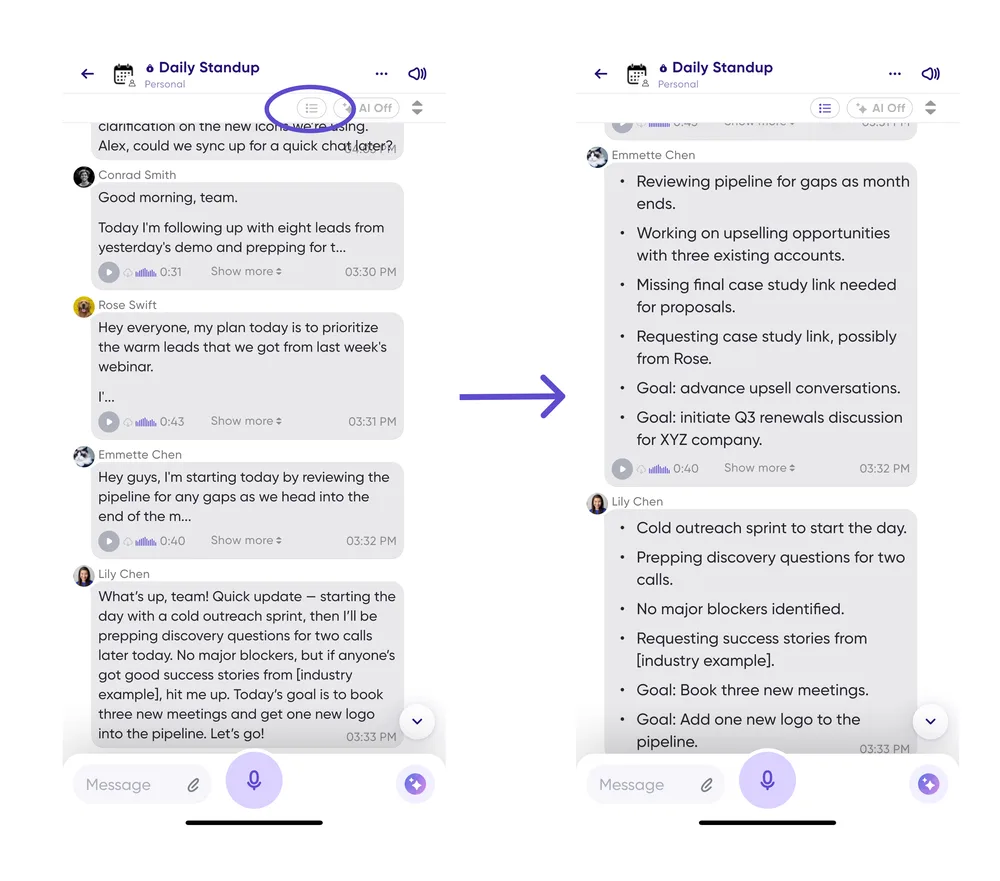
        <content type="html"><![CDATA[<p>A fast new way to catch up on a conversation, built straight from your feedback: turn every
message in a conversation into bullet points at once.</p>
<p>Instead of opening message details one message at a time, flip the switch and each message
displays as a clean, structured bulleted summary. It's noticeably faster in long threads.</p>
<ol>
<li class="">Tap the <strong>bulleted summary icon</strong> at the top right of any conversation.</li>
<li class="">Your view switches so every message shows as bullets.</li>
</ol>
<p>As you scroll, summaries generate automatically.</p>
<p><img decoding="async" loading="lazy" alt="A conversation with every message displayed as a bulleted summary" src="https://help.carbonvoice.app/assets/images/auto-bulleted-summary-afbfedeace7f914c3edf7c8945cba60e.webp" width="1000" height="881" class="img_ev3q"></p>
<blockquote>
<p>This requires a premium account and uses your plan's AI credits.</p>
</blockquote>
<p>Don't want to wait for summaries to generate as you scroll? Premium workspaces can be set
up to generate them proactively when a message is sent, so they're already there — get in
touch and we'll set it up.</p>
<p>See <a class="" href="https://help.carbonvoice.app/ai/auto-bulleted-summaries">Auto bulleted summaries</a> for the full documentation.</p>]]></content>
        <author>
            <name>The Carbon Voice Team</name>
            <uri>https://getcarbon.app</uri>
        </author>
        <category label="release" term="release"/>
        <category label="ai" term="ai"/>
        <category label="transcripts" term="transcripts"/>
    </entry>
    <entry>
        <title type="html"><![CDATA[Find people by username]]></title>
        <id>https://help.carbonvoice.app/whats-new/2025/05/23/find-people-by-username</id>
        <link href="https://help.carbonvoice.app/whats-new/2025/05/23/find-people-by-username"/>
        <updated>2025-05-23T00:00:00.000Z</updated>
        <summary type="html"><![CDATA[You can now be found by your Carbon Voice username, so anyone can reach you by typing @yourname.]]></summary>
        <content type="html"><![CDATA[<p>Heard this one before? "I downloaded Carbon Voice — how do I find you in the app?"</p>
<p>You can now be found by your Carbon Voice username, which makes it simple for anyone to
find and message you.</p>
<h2 class="anchor anchorTargetStickyNavbar_Vzrq" id="how-it-works">How it works<a href="https://help.carbonvoice.app/whats-new/2025/05/23/find-people-by-username#how-it-works" class="hash-link" aria-label="Direct link to How it works" title="Direct link to How it works" translate="no">​</a></h2>
<ol>
<li class="">Tell your contact to tap the <strong>+</strong> icon in Carbon Voice.</li>
<li class="">They type your username, like <strong>@travis</strong>.</li>
<li class="">That's it.</li>
</ol>
<p>If you already created a <a class="" href="https://help.carbonvoice.app/account-and-settings/personal-carbonlink">Personal CarbonLink</a>,
your CarbonLink handle is your username. If not,
<a class="" href="https://help.carbonvoice.app/account-and-settings/claim-your-username">claim your username</a> — it takes about 30
seconds.</p>
<p>Your contacts can also still reach you through:</p>
<ul>
<li class="">Your registered email or phone number</li>
<li class="">Your CarbonLink URL, like <code>cv.chat/travis</code></li>
<li class="">Replying to voice memos you've shared</li>
</ul>]]></content>
        <author>
            <name>The Carbon Voice Team</name>
            <uri>https://getcarbon.app</uri>
        </author>
        <category label="release" term="release"/>
        <category label="account" term="account"/>
    </entry>
    <entry>
        <title type="html"><![CDATA[Introducing listen-only conversations]]></title>
        <id>https://help.carbonvoice.app/whats-new/2025/05/13/introducing-listen-only-conversations</id>
        <link href="https://help.carbonvoice.app/whats-new/2025/05/13/introducing-listen-only-conversations"/>
        <updated>2025-05-13T00:00:00.000Z</updated>
        <summary type="html"><![CDATA[Let people listen in on a conversation without being able to post or reply — for team broadcasts and private communities.]]></summary>
        <content type="html"><![CDATA[<p><strong>Listen-only conversations</strong> let people listen in without the ability to post or reply.</p>
<h2 class="anchor anchorTargetStickyNavbar_Vzrq" id="what-its-for">What it's for<a href="https://help.carbonvoice.app/whats-new/2025/05/13/introducing-listen-only-conversations#what-its-for" class="hash-link" aria-label="Direct link to What it's for" title="Direct link to What it's for" translate="no">​</a></h2>
<p><strong>📣 Team broadcasts.</strong> Leadership can create a listen-only conversation for company-wide
announcements without accidental replies cluttering an important update — especially useful
on larger teams.</p>
<p><strong>🔒 Private communities.</strong> Good for customer communities, coaches, or external advocates
who want to share quick updates like a private podcast, without clients posting back or
seeing each other.</p>
<h2 class="anchor anchorTargetStickyNavbar_Vzrq" id="new-options-in-conversation-settings">New options in conversation settings<a href="https://help.carbonvoice.app/whats-new/2025/05/13/introducing-listen-only-conversations#new-options-in-conversation-settings" class="hash-link" aria-label="Direct link to New options in conversation settings" title="Direct link to New options in conversation settings" translate="no">​</a></h2>
<ul>
<li class=""><strong>Set as listen-only.</strong> Mark any conversation as listen-only and new members join as
listeners by default. Listen-only members can't see other listen-only members.</li>
<li class=""><strong>Control who can post.</strong> Promote an individual from listener to speaker to manage who
contributes while everyone else listens.</li>
<li class=""><strong>Flexible sharing.</strong> This works with every way of joining a conversation — add people
manually, let anyone in your workspace find and join, or share a public link.</li>
</ul>
<h2 class="anchor anchorTargetStickyNavbar_Vzrq" id="see-one-in-action">See one in action<a href="https://help.carbonvoice.app/whats-new/2025/05/13/introducing-listen-only-conversations#see-one-in-action" class="hash-link" aria-label="Direct link to See one in action" title="Direct link to See one in action" translate="no">​</a></h2>
<p>Productivity expert <a href="https://www.arimeisel.com/" target="_blank" rel="noopener noreferrer" class="">Ari Meisel</a> moved his client community,
<em>Less Doing Labs</em>, to Carbon Voice, where he shares insights and strategies straight from
his workflow. You can
<a href="https://carbonvoice.app/c/682226a660b644d9387a65fb" target="_blank" rel="noopener noreferrer" class="">join and listen in</a>.</p>
<p>See <a class="" href="https://help.carbonvoice.app/conversations/access-and-sharing/listen-only-conversations">Listen-only conversations</a>
for the full documentation.</p>]]></content>
        <author>
            <name>The Carbon Voice Team</name>
            <uri>https://getcarbon.app</uri>
        </author>
        <category label="release" term="release"/>
        <category label="conversations" term="conversations"/>
        <category label="access" term="access"/>
    </entry>
    <entry>
        <title type="html"><![CDATA[A whole new Carbon Voice app]]></title>
        <id>https://help.carbonvoice.app/whats-new/2025/05/01/a-whole-new-carbon-voice-app</id>
        <link href="https://help.carbonvoice.app/whats-new/2025/05/01/a-whole-new-carbon-voice-app"/>
        <updated>2025-05-01T00:00:00.000Z</updated>
        <summary type="html"><![CDATA[A redesigned conversation view that reads like a familiar chat window, plus a faster way to turn a discussion into a first-draft document.]]></summary>
        <content type="html"><![CDATA[<p>At least it feels that way. We rebuilt the conversation experience around your feedback,
and the result is a subtle change that makes conversations feel fresh and much easier to
follow.</p>
<p>The feedback was consistent: you wanted a chat window that felt more familiar, had less
clutter, and made it easier to tell your messages from everyone else's.</p>
<p>Check the
<a href="https://apps.apple.com/us/app/carbon-voice-ai-voice-memos/id1567782769" target="_blank" rel="noopener noreferrer" class="">App Store</a> or
<a href="https://play.google.com/store/apps/details?id=com.phononx.carbonvoice" target="_blank" rel="noopener noreferrer" class="">Play Store</a> for the
latest version.</p>
<h2 class="anchor anchorTargetStickyNavbar_Vzrq" id="a-familiar-chat-window">A familiar chat window<a href="https://help.carbonvoice.app/whats-new/2025/05/01/a-whole-new-carbon-voice-app#a-familiar-chat-window" class="hash-link" aria-label="Direct link to A familiar chat window" title="Direct link to A familiar chat window" translate="no">​</a></h2>
<ol>
<li class=""><strong>Your sent messages</strong> are always on the right and shaded purple, so it's easy to scroll
and find what you said and the replies to it. Your avatar and name are hidden, which
fits more messages on screen.</li>
<li class=""><strong>Unread and unheard messages</strong> are no longer shaded — look for the purple bubble around
the timestamp instead.</li>
<li class=""><strong>The currently playing message</strong> is highlighted with a gradient behind it.</li>
</ol>
<p><img decoding="async" loading="lazy" alt="The redesigned conversation view with sent messages shaded purple on the right" src="https://help.carbonvoice.app/assets/images/familiar-chat-window-96bc33c226091e85115112ba142a54ba.webp" width="846" height="1720" class="img_ev3q"></p>
<h2 class="anchor anchorTargetStickyNavbar_Vzrq" id="turn-discussions-into-first-draft-documents">Turn discussions into first-draft documents<a href="https://help.carbonvoice.app/whats-new/2025/05/01/a-whole-new-carbon-voice-app#turn-discussions-into-first-draft-documents" class="hash-link" aria-label="Direct link to Turn discussions into first-draft documents" title="Direct link to Turn discussions into first-draft documents" translate="no">​</a></h2>
<p>This update also makes it quicker to get a document out of a discussion:</p>
<ol>
<li class="">Tap the AI icon.</li>
<li class="">Select the time range and output type.</li>
<li class="">Get ready-to-go documentation back.</li>
</ol>
<p><img decoding="async" loading="lazy" alt="Selecting a time range and output type to turn a discussion into a document" src="https://help.carbonvoice.app/assets/images/discussion-to-document-1a6e68f9a24828a23f8ae0dc79ec93af.webp" width="1000" height="718" class="img_ev3q"></p>]]></content>
        <author>
            <name>The Carbon Voice Team</name>
            <uri>https://getcarbon.app</uri>
        </author>
        <category label="release" term="release"/>
        <category label="conversations" term="conversations"/>
        <category label="ai" term="ai"/>
    </entry>
    <entry>
        <title type="html"><![CDATA[Send messages to any email address]]></title>
        <id>https://help.carbonvoice.app/whats-new/2025/04/03/send-messages-to-any-email-address</id>
        <link href="https://help.carbonvoice.app/whats-new/2025/04/03/send-messages-to-any-email-address"/>
        <updated>2025-04-03T00:00:00.000Z</updated>
        <summary type="html"><![CDATA[Voice messages sent to an email address now lead with the full transcript, a clearer play button, and a one-click reply.]]></summary>
        <content type="html"><![CDATA[<p><strong>Speak your email.</strong> You've been able to send a Carbon Voice message to any email address
for a while — this makes it much better for the person receiving it.</p>
<p><img decoding="async" loading="lazy" alt="A Carbon Voice message as it arrives in an email inbox" src="https://help.carbonvoice.app/assets/images/voice-message-as-email-d28e0643afb568eccc0561501ac0511e.webp" width="1000" height="529" class="img_ev3q"></p>
<p><strong>Full transcript, right up top.</strong> The transcript is now in the body of the email, so the
recipient can read your message instantly. It's like sending an email by speaking.</p>
<p><strong>Clearer playback.</strong> The play button is clearer and sits at the top, so hearing your voice
is one tap away.</p>
<p><strong>Easy replies.</strong> One click and they're replying to your message.</p>
<p>To send one:</p>
<ol>
<li class="">Tap the <strong>+</strong> button on the bottom-left chat tab.</li>
<li class="">Enter one or more email addresses, then record your message.</li>
</ol>]]></content>
        <author>
            <name>The Carbon Voice Team</name>
            <uri>https://getcarbon.app</uri>
        </author>
        <category label="release" term="release"/>
        <category label="sharing" term="sharing"/>
        <category label="messages" term="messages"/>
    </entry>
    <entry>
        <title type="html"><![CDATA[Control what tapping a message does]]></title>
        <id>https://help.carbonvoice.app/whats-new/2025/03/11/control-what-tapping-a-message-does</id>
        <link href="https://help.carbonvoice.app/whats-new/2025/03/11/control-what-tapping-a-message-does"/>
        <updated>2025-03-11T00:00:00.000Z</updated>
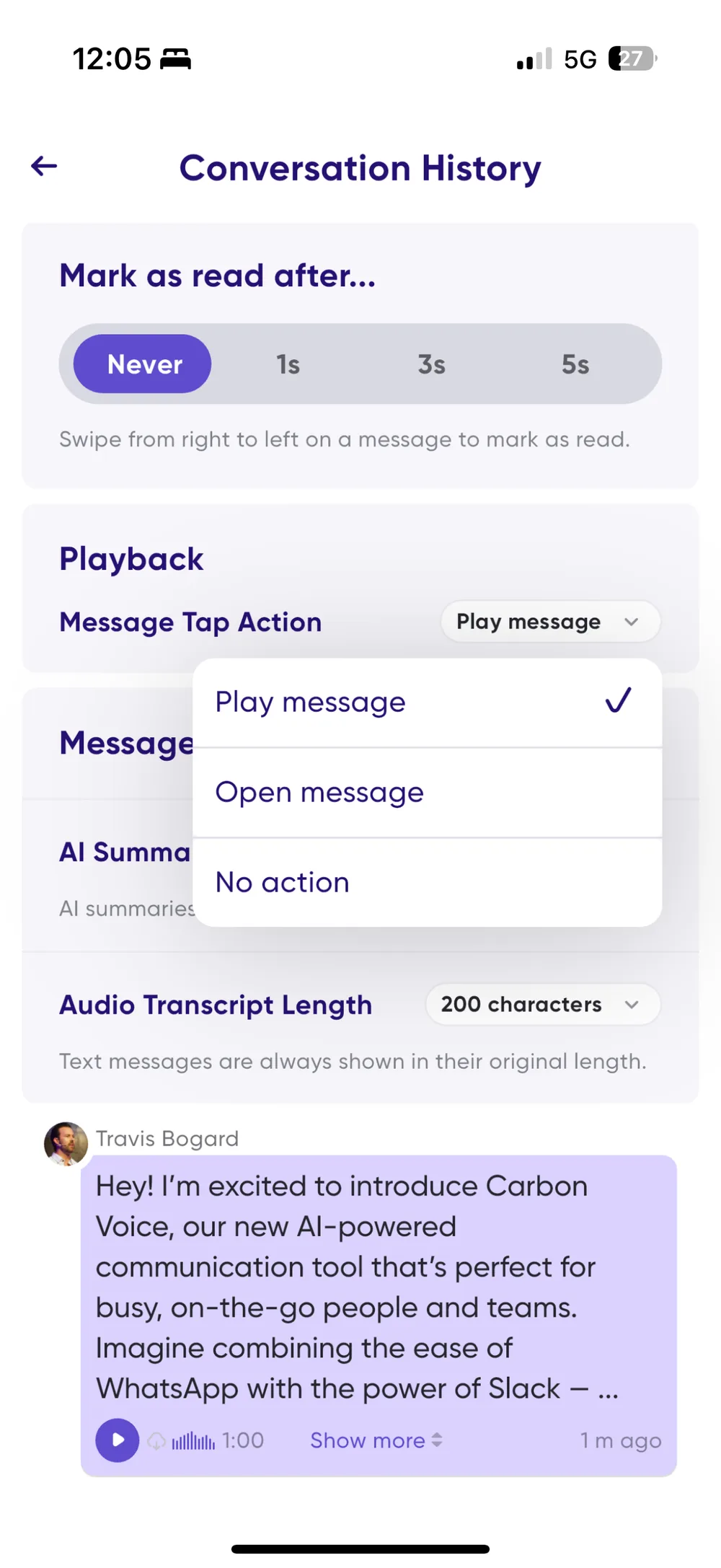
        <summary type="html"><![CDATA[A new Message Tap Action setting, a play button on audio message cards, and a bigger tap area on Show More — all to stop playback starting by accident.]]></summary>
        <content type="html"><![CDATA[<p>You told us it was too easy to start playback by accident in a conversation. This release
takes that apart in three pieces.</p>
<h2 class="anchor anchorTargetStickyNavbar_Vzrq" id="show-more-just-expands-now">Show More just expands now<a href="https://help.carbonvoice.app/whats-new/2025/03/11/control-what-tapping-a-message-does#show-more-just-expands-now" class="hash-link" aria-label="Direct link to Show More just expands now" title="Direct link to Show More just expands now" translate="no">​</a></h2>
<p>It used to be easy to tap <strong>Show More</strong> and start playback instead. The tap area around it
is now much larger, so that shouldn't happen.</p>
<h2 class="anchor anchorTargetStickyNavbar_Vzrq" id="a-play-button-on-message-cards">A play button on message cards<a href="https://help.carbonvoice.app/whats-new/2025/03/11/control-what-tapping-a-message-does#a-play-button-on-message-cards" class="hash-link" aria-label="Direct link to A play button on message cards" title="Direct link to A play button on message cards" translate="no">​</a></h2>
<p>Audio messages have a new play button in the lower left. It makes audio messages easy to
spot, and gives you somewhere to tap when you've turned tap-to-play off.</p>
<h2 class="anchor anchorTargetStickyNavbar_Vzrq" id="choose-your-tap-action">Choose your tap action<a href="https://help.carbonvoice.app/whats-new/2025/03/11/control-what-tapping-a-message-does#choose-your-tap-action" class="hash-link" aria-label="Direct link to Choose your tap action" title="Direct link to Choose your tap action" translate="no">​</a></h2>
<p>You can now decide what tapping a message card does:</p>
<ul>
<li class=""><strong>Play Message</strong> — tapping a text or audio message starts playback, as before.</li>
<li class=""><strong>Open Message</strong> — tapping opens message details instead. Text messages can be played
from inside the details, and <strong>Play All</strong> still catches you up on everything unread,
text included.</li>
<li class=""><strong>Do Nothing</strong> — tapping the body of the card does nothing. Swipe right to left to open
the message, or tap the play button in the lower left to play audio.</li>
</ul>
<p>Change it in <strong>Settings → Conversation History → Message Tap Action</strong>.</p>
<p><img decoding="async" loading="lazy" alt="The Message Tap Action setting" src="https://help.carbonvoice.app/assets/images/message-tap-action-setting-b71bea7d22b946d0a1c539aaa7828a45.webp" width="1000" height="2174" class="img_ev3q"></p>
<p><img decoding="async" loading="lazy" alt="The play button in the lower left of an audio message card" src="https://help.carbonvoice.app/assets/images/message-play-button-ad7e381dca8bfdcb947d5d73bfeb6358.webp" width="1000" height="2174" class="img_ev3q"></p>]]></content>
        <author>
            <name>The Carbon Voice Team</name>
            <uri>https://getcarbon.app</uri>
        </author>
        <category label="release" term="release"/>
        <category label="playback" term="playback"/>
        <category label="settings" term="settings"/>
    </entry>
</feed>