Advanced workspace settings
Premium workspaces can be configured to help make sure conversations and messages that belong in your workspace end up there, and stay only as long as your policies allow.
For help setting these up, reach out at support in the app.
Default conversation
Available on Lite plans and above.
Set a workspace as the default place conversations are created, and the interface will preselect it. This is a simple on or off setting.
Workspace colors and watermark
Available on Standard plans and above.
A color and watermark make a workspace's conversations stand out from those in your personal space or another workspace. You'll need to provide:
- Color — a HEX value.
- Watermark — a 64 × 64 PNG.
On the home screen, the conversation list shows the color as a stripe down the left and as a hue on the card, with the watermark across the background.
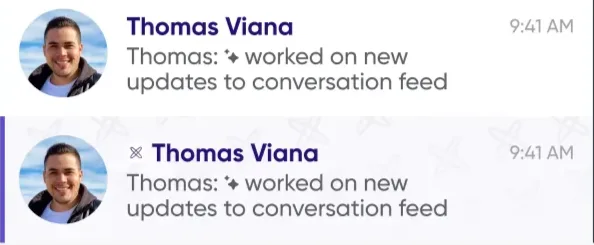
In conversation history, the color and watermark appear at the top.

Retention policies
Available on Standard plans and above.
A retention policy permanently deletes messages and conversations older than a period you set. There are two separate periods:
- All named conversations and DMs — messages older than X days are deleted nightly.
- Async meetings — counted in days after the meeting ends. Everything is preserved while the meeting is running; once it ends, the messages and conversation are cleaned up X days later.
Retention cleanup runs nightly in PST, so actual deletion happens X days after the cutoff plus however long until the next nightly run.