Slack and Google Sheets integrations
Two new ways to get at your voice memos and conversations from the tools you're already in: Slack and Google Sheets.
Slack integration
Try the Slack app. It makes moving back and forth between Slack and Carbon Voice quick:
- Notifications for new messages.
- Preview shared Carbon Voice messages right in Slack, where you can read, reply, or adjust permissions.
- Start discussions and async meetings in Carbon Voice from Slack with
/cv. - Auto-post messages and AI summaries from Carbon Voice conversations into Slack channels.
Google Sheets integration
Try the Google Sheets add-on — the first of several planned Google Apps features.
People often want to pull parts of a conversation out for notes or to build something else, which until now meant selecting messages, copying the transcript, and pasting it elsewhere. The add-on imports memos and messages from inside Google Sheets instead.
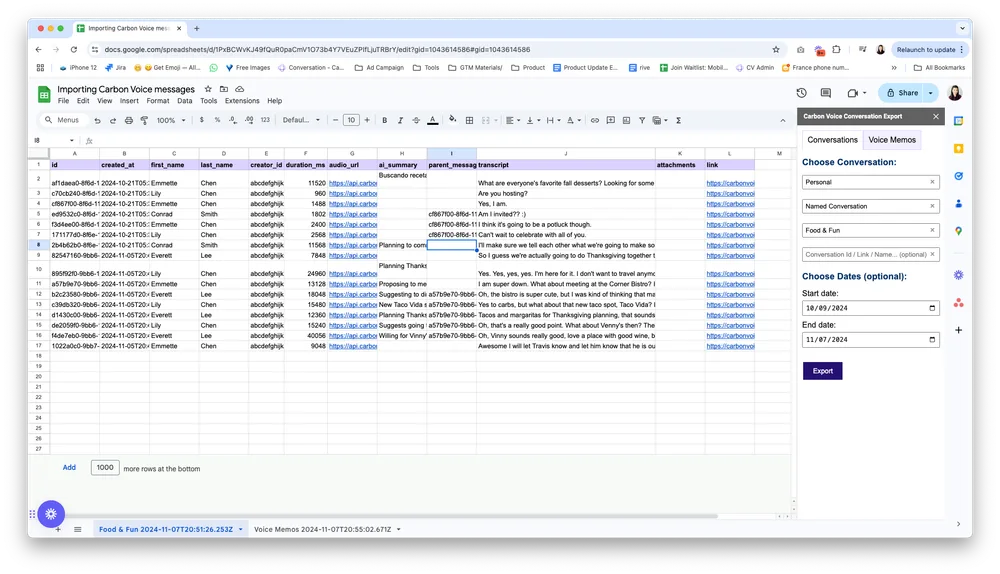
- Install the extension, or in Google Sheets go to Extensions → Add-ons → Get Add-ons and search for "Carbon Voice".
- Select a conversation, or your voice memos.
- Specify a date range, up to 30 days.
- Import into the sheet.