Auto bulleted summaries
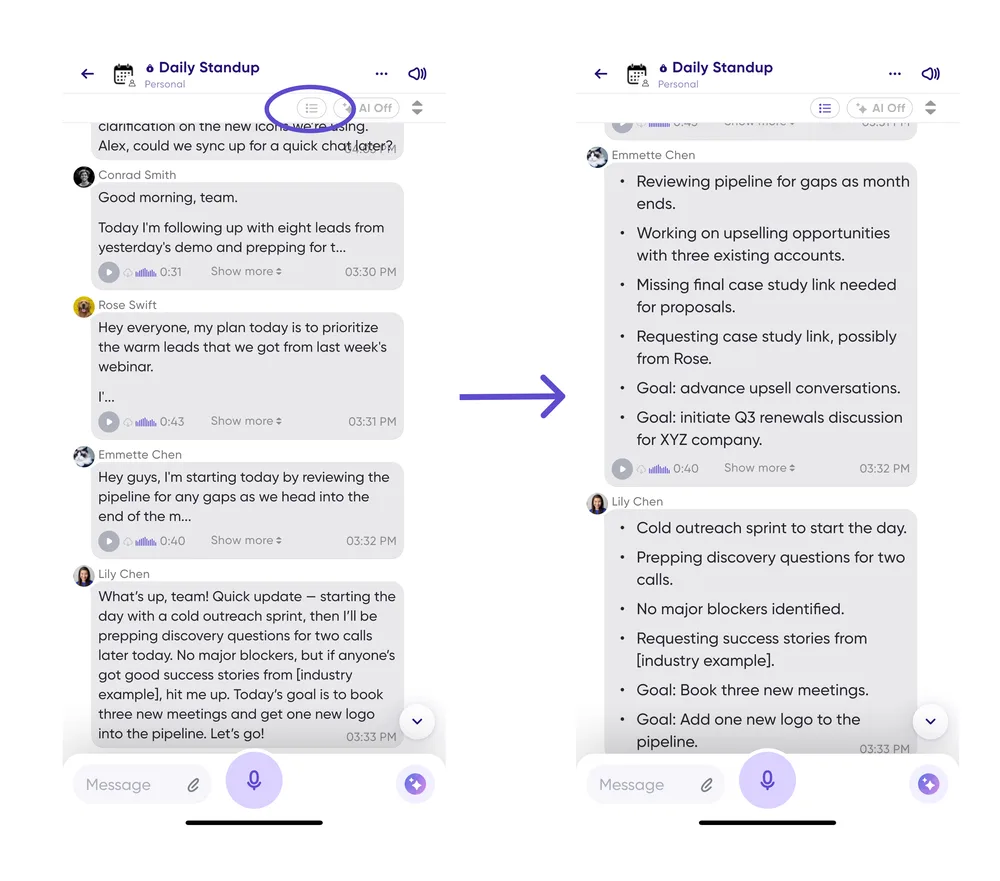
A fast new way to catch up on a conversation, built straight from your feedback: turn every message in a conversation into bullet points at once.
Instead of opening message details one message at a time, flip the switch and each message displays as a clean, structured bulleted summary. It's noticeably faster in long threads.
- Tap the bulleted summary icon at the top right of any conversation.
- Your view switches so every message shows as bullets.
As you scroll, summaries generate automatically.
This requires a premium account and uses your plan's AI credits.
Don't want to wait for summaries to generate as you scroll? Premium workspaces can be set up to generate them proactively when a message is sent, so they're already there — get in touch and we'll set it up.
See Auto bulleted summaries for the full documentation.