Seven popular AI Actions
People are getting a lot out of AI Actions, so here are the seven most popular ones based on real usage data — what they're good for, and what each actually does.
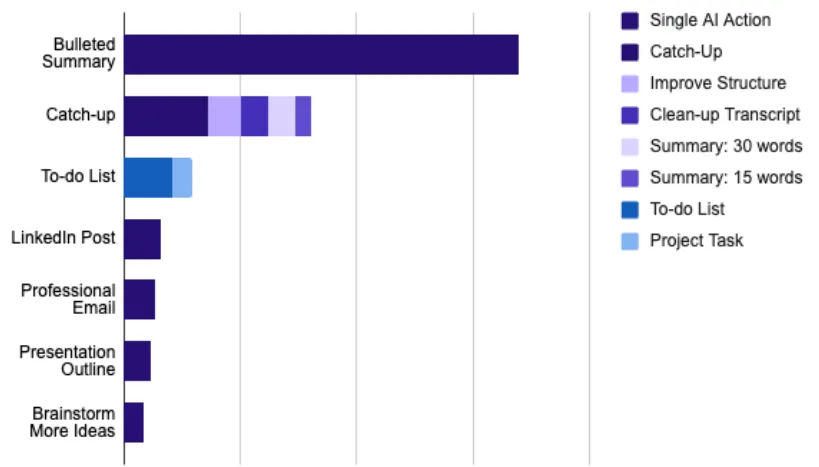
1. Bulleted Summary
Most popular by a distance.
Use it for turning a long message that arrived while you were in a meeting into a clear bulleted list, so you can focus on the key ideas without losing the whole thought. Or for turning a brainstorm memo into crisp points to follow up on.
How it works: extracts the details and points while dropping filler words, leaving something scannable.
2. Catch-up, Improve Structure, and Clean-up Transcript
A group of summary actions that all give you a faster way to consume messages.
Use them for seeing what you missed in a long, active conversation (Catch-up), polishing the wording (Clean-up Transcript), or reorganizing the ideas (Improve Structure).
How they work: Catch-up summarizes across multiple messages with takeaways and action items. Improve Structure groups related concepts for better flow. Clean-up corrects grammar and removes filler while keeping the message's flow.
3. To-do List
Use it for capturing follow-ups on the walk between meetings.
How it works: scans for actionable items and turns them into an organized, prioritized task list.
Use the Zapier integration to feed the list into your task manager automatically.
4. Presentation Outline
Use it for talking through a slide overview and getting a slide-ready outline back in minutes, suggested visuals included.
How it works: builds a structured outline with titles, key points, and visuals, slide by slide.
The Google Slides add-on turns that outline into actual slides.
5. Professional Email
Use it for the polished email you need to send when all you have is a rough sense of what to say.
How it works: takes your voice notes and turns them into a clear, professional email.
6. LinkedIn Post
Use it for the insight that arrives while you're out — capture it, then refine it into something with clarity and impact.
How it works: formats your ideas into a structured post, with hashtag suggestions and an engaging tone.
7. Brainstorm More Ideas
Proof that AI can do more than reformat your ideas — it can help make them better.
Use it for when you're stuck on a project and need fresh directions.
How it works: analyzes the context of your discussion and generates relevant ideas to build on.
Press and hold any message or voice memo to start using AI Actions. See Transform with AI Actions for the full picture.